Using the CCD Utility in the Development Environment
The CCD utility is located in the Windchill folder. Perform the following steps to use the CCD utility in the development environment:
1. Prepare a customization package as per the Package Structure for Customization Artifacts. The default location for the customization package is /opt/ptc/customization.
Alternatively, you can specify a different location, using the property wt.customizationSource.dir.path=<path to source code> in the <WT_HOME>/bin/customizationTools/customizationTools.properties file.
 |
• The CCD tool must have Read, Write, Modify, and Execute access to the location of the customization package.
|
2. Open a Windchill shell and navigate to <WT_HOME>/bin/customizationTools/.
3. In the Windchill shell, execute the following:
ant <target name>
|
|
• Select the target name as per the business requirement. For more information about ant targets, see Targets.
• You can run the CCD utility in Linux and Windows environments.
|
The log file is generated in <WT_HOME>/buildlogs/customizationLogs. The CustomizationInstallLogs_<TimeStamp>.log file contains all detailed messages of script executions. The detailed messages are for both success and failure cases.
|
|
The customization package ZIP should not have any root folder but must include all modules & configurations under it. While creating the .ZIP folder, ensure that you select only the contents of the root folder and not the root folder itself. For example, to create the .ZIP file for custom_src_root_dir folder, only select the content under the custom_src_root_dir folder. 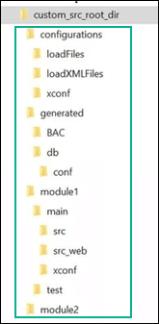 |