About Set Location Action in MPMLink
You can use the Set Location window to set a location. The Set Location window presents the following features:
• The Context and Folder fields to specify a context/location
• A location string field that dynamically displays the current folder path
• A group of navigational actions as described in the following table.
|
Action
|
Description
|
|---|---|
Previous Location  |
Resets the location screen to the previous display. When selected, the context, location, and folder location string fields show the values shown in the previous display.
|
Up One Level  |
Moves your navigation from a lower folder level to the next higher folder level. When selected, the window refreshes to show the folders at the next higher level and the folder location string for the next higher level.
|
The Set Location window opens when you click the  Set Location action, which is available at multiple locations in MPMLink.
Set Location action, which is available at multiple locations in MPMLink.
For example, the Set Location is available in the Set Downstream Parameters step of the Generate Mass Downstream BOMs dialog box. This dialog box opens when you initiate the  Generate Mass Downstream BOMs action.
Set Location is available in the Set Downstream Parameters step of the Generate Mass Downstream BOMs dialog box. This dialog box opens when you initiate the Generate Mass Downstream BOMs action.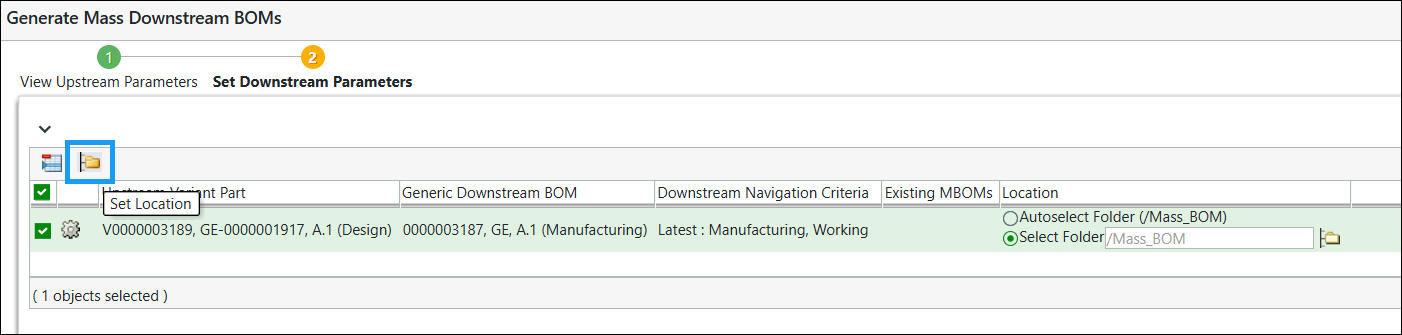
The Set Location action is also available at multiple locations.
Set Location action is also available at multiple locations.For more information, see the following topics:
To browse to a location by context, perform the following steps:
1. Select a context from the Context menu. The top-level folder locations for that context are displayed in the Folder list field.
2. Select a folder location from the Folder list field. Click Open to navigate to the next lowest level. The next level of folders appears in the location list, and the currently specified location is displayed in the location string field.
3. As needed, click the previous location icon , the up one level icon , or the create new folder icon  to navigate to a preferred location.
, the up one level icon , or the create new folder icon to navigate to a preferred location.4. Click OK. The context/location you specified is set for the object.
Consider the following points:
• In MPMLink, you can set the location in two ways:
◦ Using OIR. For more information, see Using OIRs for Naming and Numbering.
◦ By setting the value in the > > and > > MPMLink preferences.
The system prioritizes the location value configured through OIR.
◦ If you have already set the preference for the location, the system uses it as the default location while performing the actions such as Generate Mass Downstream BOMs, New Split Assemblies etc.
Generate Mass Downstream BOMs, New Split Assemblies etc.◦ When you set a value in the preference and also specify a value in OIR, the system gives more importance to the location value set in the OIR rules. It displays the location set in the OIR rules in the Autoselect Folder.