Intake Processor Scan — Windchill+ Guideline Checks
At the Code Inspect stage in the CloudWave validation process, the Intake Processor is triggered. The Intake Processor inspects the code to verify whether the uploaded CCD package complies with the Windchill+ guidelines.
For information on these guidelines and guardrails, see Windchill+ Guidelines and Guardrails.
The Intake Processor scans the uploaded package and generates three reports: two in the HTML format and one in the CSV format. The HTML reports are shared with the partners, who can use them to resolve any issue and re-deploy the CCD package if required.
Intake Processor Output Reports
The following reports are generated after the Intake Processor scan is performed :–
• Windchill Custom Class Assessment Report (HTML format)
• Windchill Changed File Report (HTML format)
• Customization API Usage Details (CSV format)
The following section describes the contents of each report.
Windchill Custom Class Assessment Report
This report provides the information on all classes with at least one identified issue.
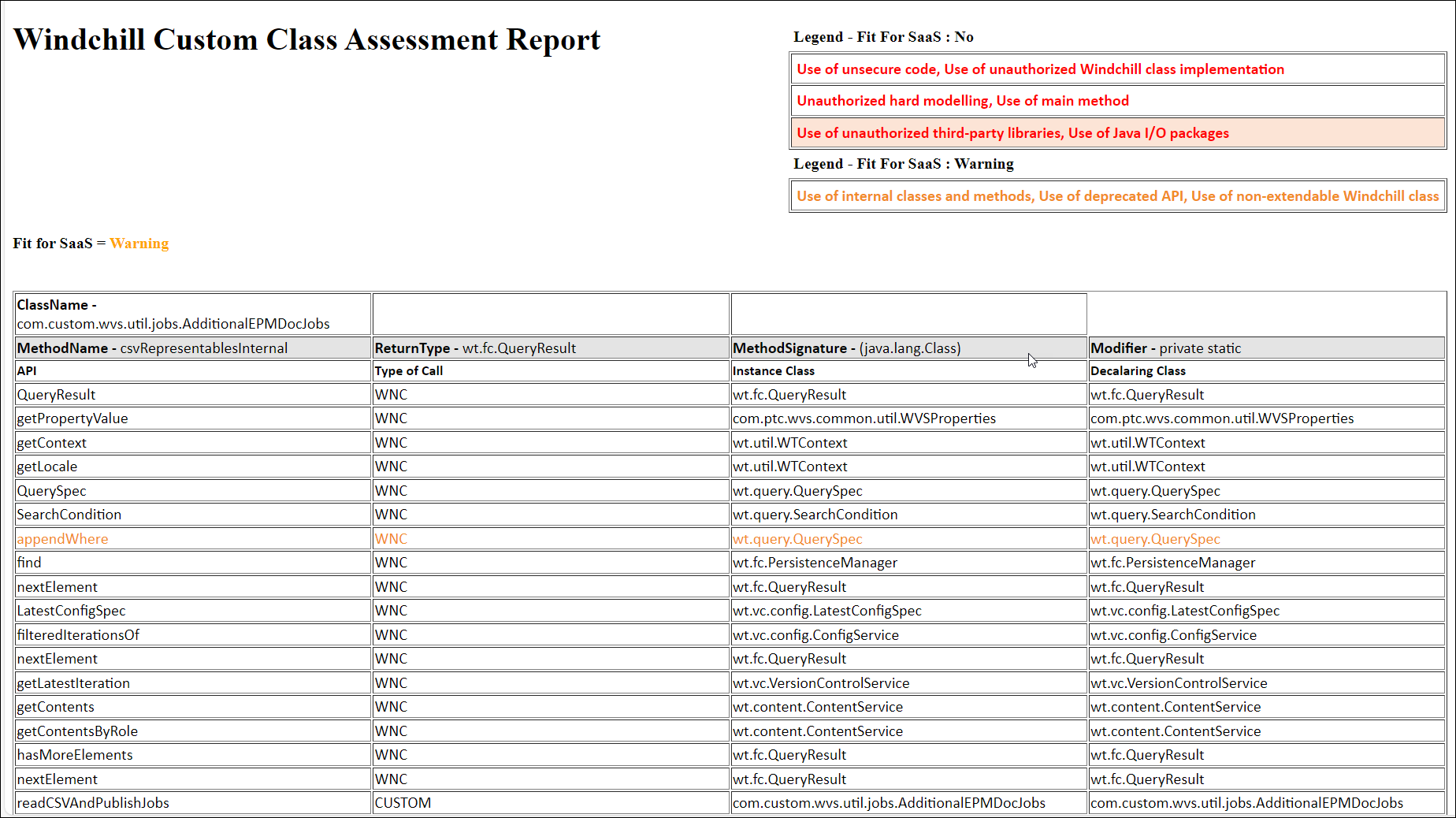
For each class, the report shows details such as method names, APIs, and any identified issues.
The Fit for SaaS value is Yes if no issues violating the Windchill+ guardrails are identified. In this case, no further details are displayed on the HTML page.
The Fit for SaaS value is Warning if any issues are detected that are temporarily allowed but require user action to fix the customization. In this case, the CCD package is passed.
The Fit for SaaS value is No if any issues violating the Windchill+ guardrails are detected. In this case, the CCD package is rejected or marked as failed.
This report shows information about only the classes with at least one identified issue. It includes details such as the Method Names, APIs, Return Type, MethodSignature, Type of Call, Instance Class, and Declaring Class.
 | The types of call are categorized as WNC, Custom, Java, 3rdParty-Allowed, or 3rdParty-Not-Allowed. WNC - Windchill API call Custom - Custom class API call 3rdParty-Allowed - Allowed Third party Library API call 3rdParty-NotAllowed - Not allowed Third party Library API call Java - Java API call |
The identified issues in the class are marked with the following color codes:
Red Text — Violations to the Windchill+ guidelines are marked in red and the CCD package is rejected or marked as failed.
Orange Text — Warnings are marked in orange. In this case, the CCD package is not rejected; it is a warning for the user to resolve the identified issues.
Black Text — Text in black indicates adherence to the Windchill+ guidelines. It means there is no error with that element.
Windchill Changed File Report
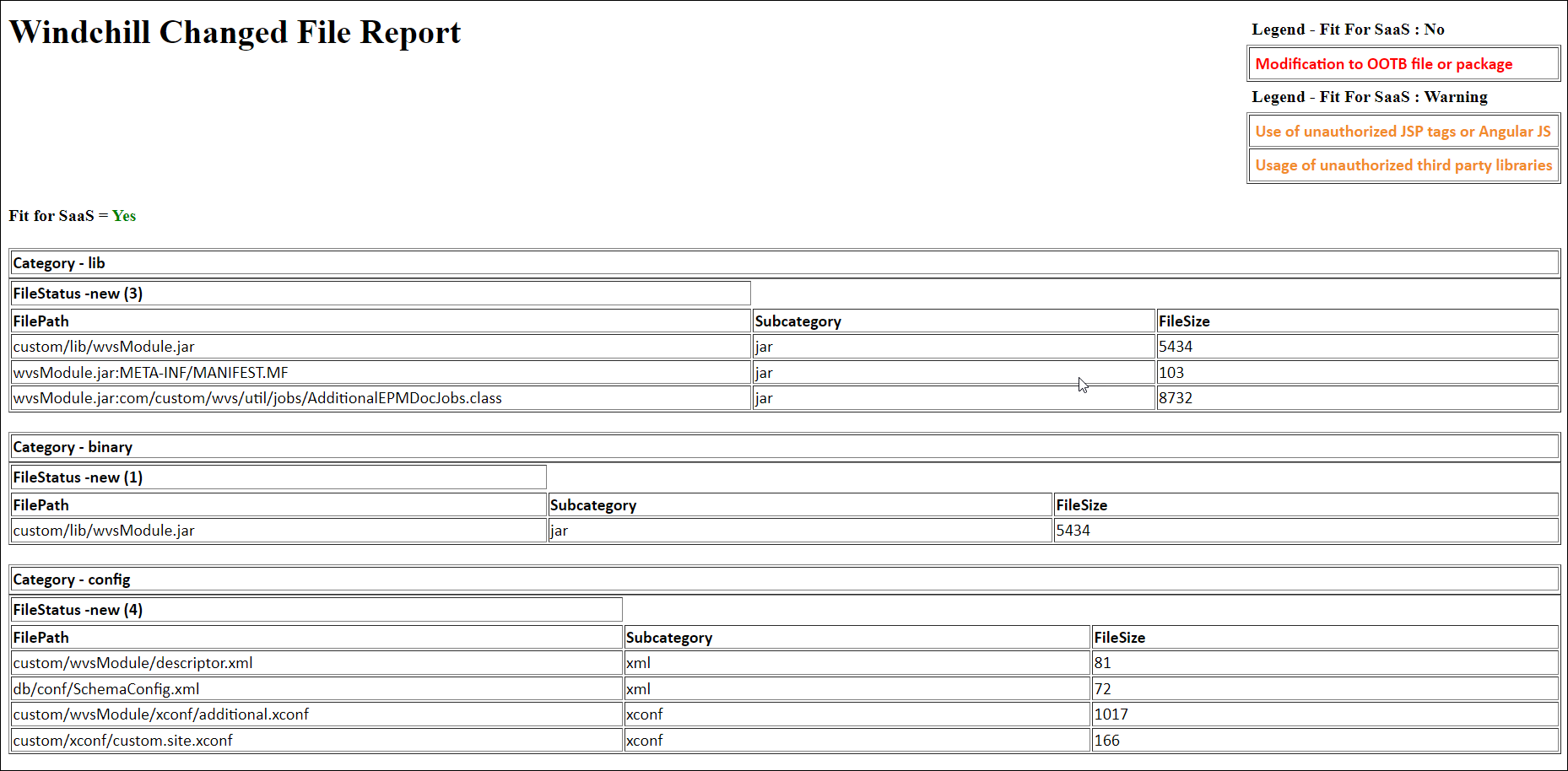
This report provides the details of all the files which are either newly created with file status “New” or OOTB modified files with file status “Existing”.
The Fit for SaaS value is Yes if no issues violating the Windchill+ guardrails are identified. In this case, no further details are displayed on the HTML page.
The Fit for SaaS value is Warning if any issues are detected that are temporarily allowed but require user action to fix the customization. In this case, the CCD package is passed.
The Fit for SaaS value is No if any issues violating the Windchill+ guardrails are detected. In this case, the CCD package is rejected or marked as failed.
The categories are as follows:
Lib - Lists all the files extracted from the jars.
Binary - Lists all the jar files.
Source - Lists all the source files such as Java, JS, JSP.
Config - Lists all the non-binary files.
The Identified issues in the class are marked with color codes as below.
Red Text — Violations to the Windchill+ guidelines are marked in red and the CCD package is rejected or marked as failed.
Orange Text — Warnings are marked in orange. In this case, the CCD package is not rejected; it is a warning for the user to resolve the identified issues.
Black Text — Text in black indicates adherence to the Windchill+ guidelines. It means there is no error with that element.
Customization API Usage Details
This reports contains a list of all APIs without identified issues.