Viewing Related Information in a Structure
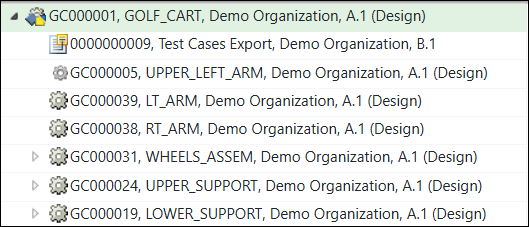
You can show or hide related information in the structure using the options described below. When displayed, related objects appear under the parts in the structure.
• Show/Hide Related Information in the right-click actions menu.
Select the object types you want to display in the part structure or select one of the following options:
◦ Show All — Displays related information in the structure pane by automatically selecting all the object types. The selected object types are indicated by a check mark displayed beside each object type.
◦ Hide All — Removes all related information from being displayed in the structure pane and clears the check marks from the object types.
◦ Manage Related Information — Opens a new window from which you can select and clear multiple related information object types. If you have selected Show All earlier, all the object types displayed in the window are already selected when you select this menu option.
For information on the object types that you want to display, see Viewing Action Set - Parts.
• Show and Hide buttons  in the Viewing action set in the toolbar.
in the Viewing action set in the toolbar.◦ The dropdown list next to the Show button — Select the object types you want to display in the part structure or select one of the following options:
▪ Show All — Displays related information in the structure pane by automatically selecting all the object types. The selected object types are indicated by a check mark displayed beside each object type.
▪ Manage Related Information — Opens a new window from which you can select and clear multiple related information object types. If you have selected Show All earlier, all the object types displayed in the window are already selected when you select this menu option.
For information on the object types that you want to display, see Viewing Action Set - Parts.
◦ Hide button — Removes all related information from being displayed in the structure pane.
 | The Show My Related Information action and the Show button in the toolbar function the same. Similarly, the Hide All action and the Hide button in the toolbar function the same. |