Overconsumption of Part Allocations in Generic Process Plans
In complex manufacturing environments where products are built with multiple variant configurations, it is often necessary to allocate the same part across multiple operations. This scenario arises when different operations represent alternative paths in the process plan, each corresponding to a specific variant or choice. This use case is supported through a feature that enables part overconsumption, allowing the same part to be allocated across multiple operations within a process plan. This capability is especially useful when creating generic process plans that represent all possible variant configurations. It ensures flexibility in planning while maintaining traceability and correctness in the final variant-specific process plan.
Business Use Case
A jewelry manufacturer uses a single diamond part across multiple gold variants. Each variant has a unique operation path, but the diamond remains constant. With part overconsumption, the diamond can be allocated to all relevant operations without duplicating it in the BOM, and only the operation matching the selected variant is executed.
Key Capabilities:
• You can now allocate a single part to multiple operations within a generic process plan. This enables modeling of realistic manufacturing scenarios where a common part (e.g., a diamond) is used across different material variants (e.g., rose gold, yellow gold) without duplicating the part in the BOM.
• Variant-specific qualification—Although the same part is allocated to multiple operations, only one operation is qualified per variant based on the selected choices. This ensures accurate traceability and prevents over-allocation in the final variant.
• Enable the Do not Hide Allocated Parts option to seamlessly overconsume parts in the process plan tree picker visualization.
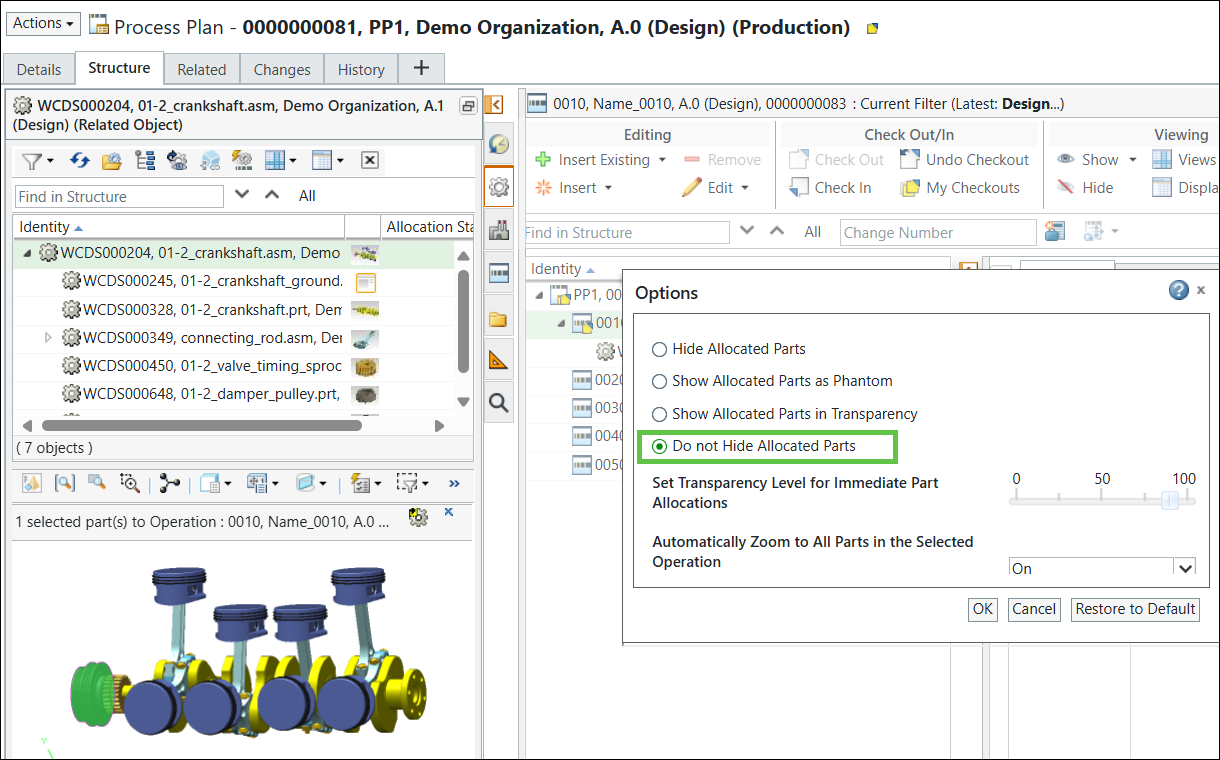
 | When you select the Do not Hide Allocated Parts option, the system does not hide the already consumed parts from the Visualization tab. |
System Behavior and User Messages
• When there is an attempt to overconsume a part, the Windchill system prompts with a confirmation message: You are about to overconsume the selected part across multiple operations. Do you want to continue? This ensures user awareness and control over the allocation behavior.
• If you try to allocate the same part to the same operation again, the system blocks the action and shows an error message indicating that the part is already allocated.
• Allocation status can reflect 100% usage across multiple operations, especially when modeling 150% BOM scenarios in generic plans.
Usage Expressions and Filtering
• Usage expressions are applied at the operation level to control which parts are qualified under specific variant configurations.
• The system filters operations and parts based on selected options and choices, ensuring that only relevant operations are included in the generated process plan.
Best Practices
• Use generic process plans to model all possible variant flows and apply overconsumption where common parts are reused.
• Ensure that usage expressions are correctly defined to avoid unintended allocations.