New CAD Document (CATIA V5)
The Windchill New CAD Document option is available from CATIA V5 or from the workspace File menu.
When CATIA V5 is connected to Windchill Workgroup Manager, the New CAD Document action in CATIA V5 enables you to specify the Windchill attribute information and create new CAD documents in the same way as you would in Windchill, without leaving the CAD environment.
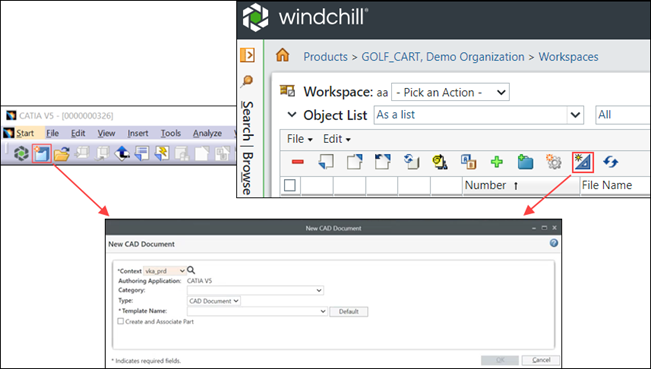
To create a new CAD document:
1. In CATIA V5, click  . Alternatively, click > > or click
  from the Windchill workspace. The New CAD Document window opens.
. Alternatively, click > > or click from the Windchill workspace. The New CAD Document window opens.2. Select a value in the Context box. You can also click  to search for the context name.
to search for the context name.3. Select values in the Category, Type, and Template Name boxes. Based on the selected template, the Attributes section in the New CAD Document window opens.
 | In the Template Name box, you can select a template or click Default to set a default template. |
| | The out-of-the-box templates are provided as samples. However, it is recommended to create your own templates. For more information on creating templates, see Creating a CAD Document Template. If you use an out-of-the-box template, you may get a warning that the file format is from an older version and will be updated. To avoid this warning, use your standard authoring application to correct the file version or update the template to match the current CAD version. |
4. Enter the values for the various attributes like Name, File Name, Revision, Description, and Location.
5. Select the Create and Associate Part checkbox to create an associated part with the new CAD document.
 | It is recommended that you associate a part with a CAD document during the object creation, and not when you create a structure. |
6. Select the Open in Authoring Application checkbox to open the new CAD document in the authoring application.
7. Click OK to complete the task. A CAD document is created in the active workspace.
For more information, see Creating a New CAD Document.
Out-of-the-box New CAD Document Templates
PTC provides out-of-the-box New CAD Document templates for all Windchill Workgroup Manager solutions. This provides you with the ability to create new Windchill PDMLink CAD Documents without having to configure templates first. You can create your own templates or modify the out-of-the-box templates, to get up and running quickly.