Opening a Service Request
Perform the following steps to open a service request:
1. Authenticate at the PTC support web page.
2. Open a case with PTC Support.
3. Choose Report an issue with PTC Cloud environment.
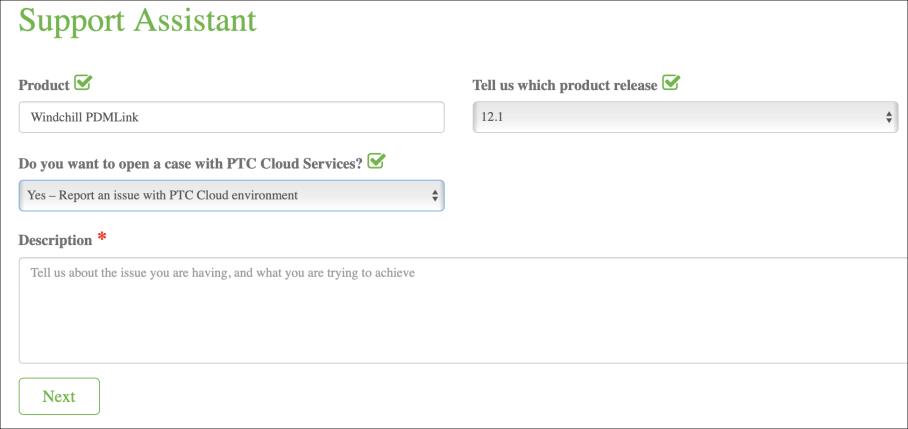
Following are a few samples used for description:
Scenario | Sample Text | ||
|---|---|---|---|
Request or renewal of the SAS token | • Share the SAS token to access the storage account for build deployment. • Share the SAS token to access the storage account for enabling the ERP connector integration setup.
| ||
Add IP address or Subnet ID to the allow list | Add the following IP address to the allow list for accessing the storage account. | ||
Automated build deployment setup | Enable automated build deployment and share back the setup details. | ||
Rehost | Rehost production environment <URL of production environment> to <Target environment type> or <Target environment URL>. | ||
WBM Staging DB Export | Execute staging database export from <environment URL>. Split the export <yes/no>, file size should be <e.g., 1 GB/5GB/10GB>. The staging database is of the type: <Foundation, All, Optional>. | ||
WBM Staging DB Import | Import the WBM Staging database from the storage account. DB name: <specify DB name with .dmp extension>, Schema name: <specify the schema name>
| ||
For WBM loading | Execute the following WBM activity on <environment URL>. Task: All.
| ||
For Content migration | Execute content migration on <environment URL>. | ||
Request for registering a client at Windchill side, to enable client credential grant type of authentication. | Register a new Windchill user or service principal with client credential grant. The details are given here: • grant_type: client_credentials • CLIENT_ID: <sample> • NAME: <sample> • SCOPE: WINDCHILL_READ
|
