Route Manager
The Route Manager enables you to create production routes for execution. A production route represents the route taken by a work order for producing a final product.
 |
Routes are not used for any type of fabrication document in CWC.
|
The Route Manager has two tabs: Route Manager and Approvals.
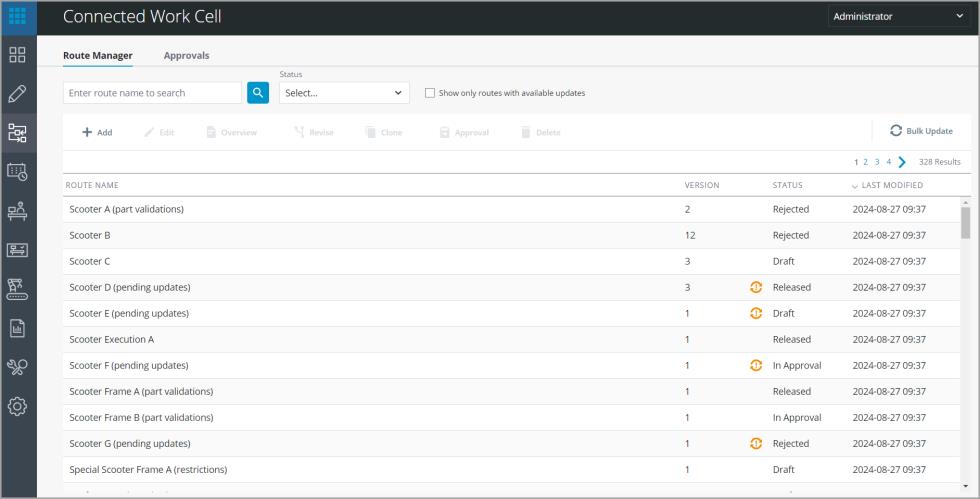
Route Manager tab
The Route Manager tab lists details of each route such as route name, version and status. The latest version of the route is always displayed. Once a route is created, it passes through different statuses before being ready to be used. There are four route statuses:
1. Draft—A newly created route is in the Draft status. The route is in edit mode for all the configurations to be completed.
2. In Approval—Once all configurations are completed, the route can be sent for approval. Whether the route requires approval depends on the route configuration. If the route is sent for approval, its status moves to In Approval until the reviewer approves or rejects the route.
When a route does not require approval, and it can be released from the Draft status and move directly to the Released status.
3. Rejected—If the reviewer rejects a route, the status changes to Rejected. The route can be resubmitted for approval after the required modifications are made.
4. Released—Once a route is approved, the status changes to Released.The route is now available to execute work orders. A route must be in the Released status before it can be used in production.
When a route is selected from the list, the status of the route determines which actions are enabled in the toolbar. For more information, see Route Actions for details.
Routes can include more than one work instruction and span different stations. The Route Manager allows you to create multiple versions for a single route. However a route has a single status (Draft, Rejected, In Approval ,or Released) regardless of how many versions the route has. Routes that contain one or more work instructions that are pending update are indicated by  .
.
.See the permissions for Route Manager in Route Manager permissions before proceeding with route actions.
Approvals tab
The Approvals tab shows a list of routes which are pending approval. A reviewer can preview a route and approve or reject a route. For more information, see Approve Route.
For route approval permissions, see Route Approval permissions