Cache Collections Size Diagnostics
Cache Collection Size Diagnostics
Cache Collections are runtime data shared between ThingWorx nodes and are designed to be small collections, so if their size grows more than expected, it might cause performance issues. For example, when Ignite collections grow too large, Ignite performance and resources are impacted, leading to overall system instability.
To monitor these Cache Collections, diagnostics were added. Using the diagnostics, you can monitor the size of each collection and get warning log messages when a collection grows larger than expected.
 |
When warning log messages are reported in the log, consult with PTC to fix this collection.
|
To enable these diagnostics, the following two new configuration sections were added to Utilization Subsystem:
• Cache Collection Size Diagnostics — global setting, applicable to all collections
• Cache Collection Size Diagnostics Per Category — category level setting, applicable to all collections in a category and overwrites the global setting
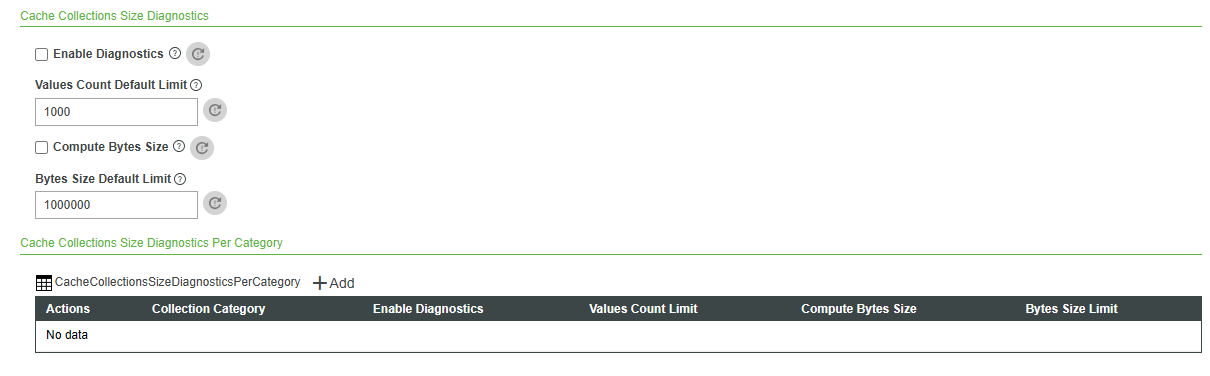
The size limitation can be set by the number of values in the collection or the collection's bytes size.
|
|
Performance may be impacted when Cache Collection Size Diagnostics are enabled globally or per category. Select the Enable Diagnostics checkbox for the diagnostic period only.
|
Cache Collection Size Diagnostics includes the following:
1. The Enable Diagnostics checkbox is clear by default. When Enable Diagnostics is selected, the application log will contain information about cache collections exceeding the configured limits, which will be applied to all existing cache collections.
|
|
You can exclude collections from being written to the log by using the Cache Collection Size Diagnostics Per Category section.
|
2. The Values Count Default Limit textbox defaults to 1000. When the Enable Diagnostics checkbox is selected, a warning will be written to the application log once the overall number of values in a collection exceeds the limit.
|
|
The BytesSize metric will never be reported for single-node ThingWorx and will not be reported for HA until the first time bytes size computation is enabled.
|
3. The Compute Bytes Size checkbox is clear by default. When Compute Bytes Size is selected, the application logs the collection bytes size and the number of values in the collection.
4. The Bytes Size Default Limit textbox defaults to 1000000. When Enable Diagnostics and Compute Bytes Size is selected, a warning will be written to the application log once the collection’s byte size exceeds the limit.
|
|
The checkbox settings and limits can be overridden for specific categories in the Cache Collection Size Diagnostics Per Category section.
|
Cache Collections Size Diagnostics Per Category
Cache Collection Size Diagnostics Per Category includes a multi-row table. The table is initially empty, and administrators can add rows for specific collection categories. Each row contains the following:
1. Collection Category — as reported in the log
2. Enable Diagnostics
3. Values Count Limit
4. Bytes Size Limit
5. Compute Bytes Size
The values in Cache Collection Size Diagnostics Per Category rows take precedence over the global values in the Cache Collection Size Diagnostics section.
|
|
To focus on specific categories only, use the Cache Collection Size Diagnostics Per Category section only while keeping this global diagnostics checkbox clear.
|
Once an administrator sets the cache collection diagnostics, a warning message in the following format will be written to the log when the collection passes one of the limits:
Warn:Limit exceeded for collectionType: ***, collectionCategory: [***], collectionKey:[***]:values count exceeds *, bytes size exceeds *
The same warning could appear a large number of times. To reduce the number of repeating messages, you must add the com.thingworx.cache package name to the repetitive log filter list in the Logging Subsystem.
When Trace level is enabled for the whole application or com.thingworx.cache.SharedValueSizeImpl logger specifically, a message similar to this will be printed every time the cache collection is written to:
Trace:collectionType: *, collectionCategory: [***], collectionKey: [***] : * values, *bytes, collection retrieval took (msec) *, values count took (msec) *, bytes size compute took (msec) *
Monitoring Cache Collection
For other options to monitor Cache Collection, see the following: