Status Message
The Status Message function is a non-visual widget that you can use to display an error, info, or warning message. You can use the function to tell users about events, give more information, and display warning messages. The status message appears at the top of the mashup when the ShowMessage service is triggered by an event.
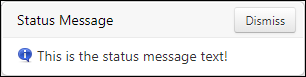
Function Options
You can set the following configuration options for the Status Message function:
• Description—Sets a description for the function.
• Message Type—Controls the style and the duration of the message. The following options are supported:
◦ Info—Displays an info icon and disappears automatically after several seconds.
◦ Warning—Displays a warning icon and disappears automatically after several seconds.
◦ Error—Displays a persistent error message with an error icon. The message remains visible until the user manually dismisses it.
• Message—The text to display in the message.
Creating a Status Message Function
1. On the Functions panel, click  . The New Function dialog opens.
. The New Function dialog opens.2. Select Status Message from the drop down list.
3. Enter a name for the function, and then click Next.
4. Select a message type.
5. Under Message, enter a message or select a localization token entity.
6. Click Done.
The function is added to the Functions panel under the Status Messages category.
Function Properties
The Status Message function has the following properties.
|
Property
|
Description
|
Base Type
|
Default Value
|
Bindable? (Y/N)
|
Localizable? (Y/N)
|
|---|---|---|---|---|---|
|
Message
|
A bindable property that sets the status message text.
|
n/a
|
n/a
|
Y
|
N
|
|
ShowMessage
|
A bindable service that displays the status message in the mashup.
|
n/a
|
n/a
|
Y
|
N
|