Overview of Model Context Protocol
 |
The Model Context Protocol (beta) is currently offered in preview mode and provides only basic functional validation. Full qualification and expanded capabilities will be introduced in future releases.
|
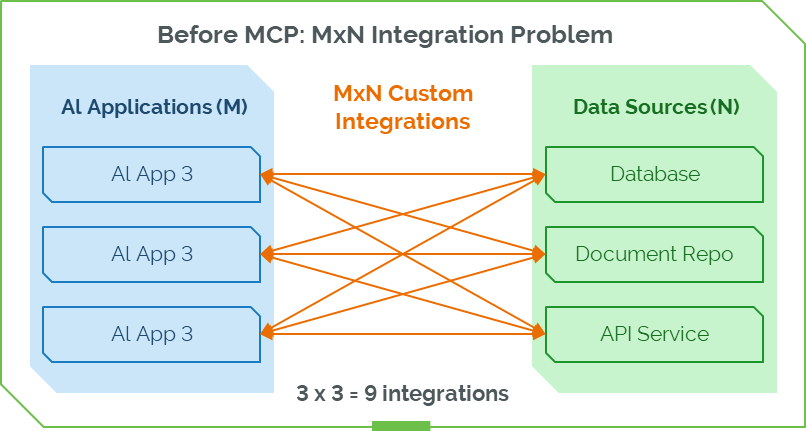
Traditionally, each AI application requires a custom integration with every backend system. In an environment with M AI applications and N data sources, this results in M × N independent integrations.
For example, three AI applications connecting to three data sources already require nine separate integrations, each with its own authentication logic, data mapping, error handling, and ongoing maintenance. As the number of systems grows, this model becomes harder to scale, adds engineering overhead, slows feature delivery, and creates inconsistencies in how applications consume enterprise data.
MCP eliminates this fragmentation by standardizing how AI applications interact with external systems.
The diagram below illustrates the M×N integration challenge, showing how multiple AI applications and data sources create a web of custom connections that quickly becomes complex.
How MCP Simplifies Integration
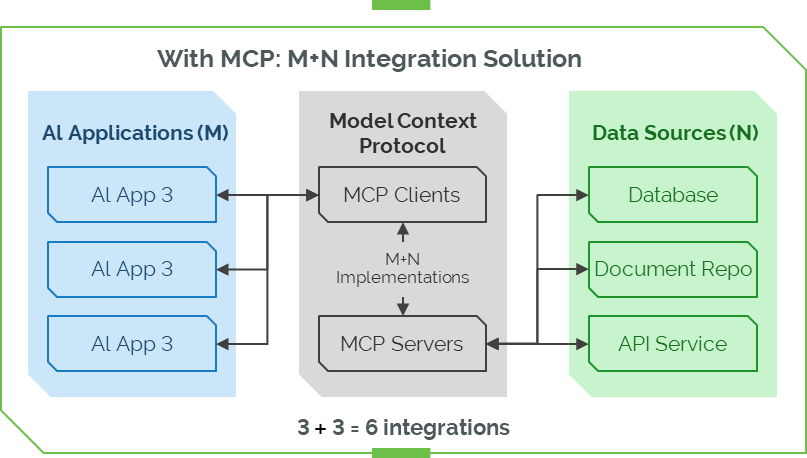
MCP introduces a standardized interaction layer between AI applications and backend systems. Instead of requiring each AI application to integrate individually with every data source, MCP provides a unified framework through MCP Clients and MCP Servers:
• AI applications integrate once with an MCP Client.
• Data sources integrate once with an MCP Server.
MCP then manages the interaction model, including tool execution, schema exchange, and contextual communication. This shifts the integration pattern from an M×N model, where every application requires a direct custom integration with every data source, to an M+N model, where each system connects only once to the MCP ecosystem.
In practical terms, for three AI applications and three data sources, the integration count drops from nine to six. This standardized approach improves scalability, reduces maintenance overhead, and enables consistent interoperability across diverse systems.
The diagram below shows how MCP changes the integration pattern from M×N custom connections to a streamlined M+N model, reducing complexity and improving scalability.
MCP Integration Across Multi-Site ThingWorx Deployments
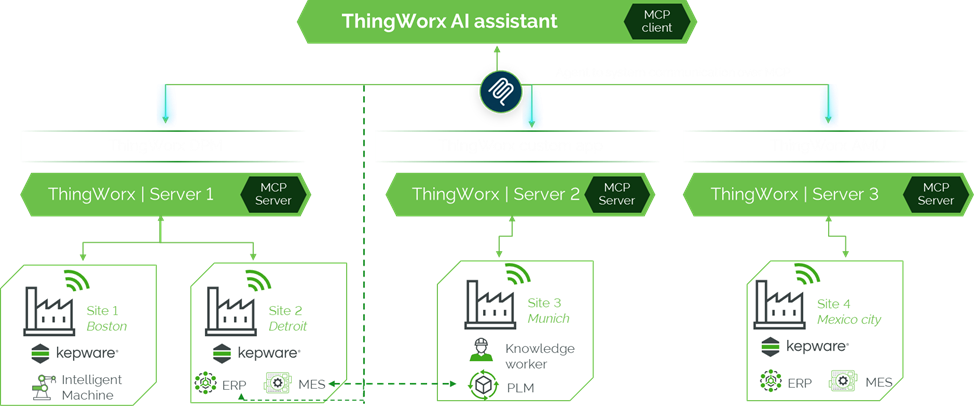
The following diagram illustrates how the MCP enables intelligent, unified interaction between AI systems and distributed ThingWorx environments across multiple manufacturing sites.
AI Interaction Layer
At the top level, the ThingWorx AI Assistant can operate as an MCP Client, allowing AI agents to invoke ThingWorx services through standardized MCP interactions. This enables workflows such as data queries, diagnostics, or intelligent automation.
Custom applications and ThingWorx applications, for example, DPM and AMU) may also communicate through the same MCP interface.
ThingWorx MCP Servers
Each ThingWorx instance, deployed per manufacturing site or region, acts as an MCP Server, exposing platform capabilities (tools, prompts, and resources) through MCP. This allows AI applications to connect to any site using a consistent interface without custom integrations.
Example site deployments shown in the diagram include:
• Server 1–sites 1 and 2 (Boston, Detroit)
• Server 2–site 3 (Munich)
• Server 3–site 4 (Mexico City)
Each server integrates with local operational systems such as ERP, MES, PLM, and Kepware-connected industrial equipment.
Multi-Site Digital Thread With MCP
MCP provides a standardized communication layer between AI clients and ThingWorx servers across all sites. Benefits include:
• A unified, consistent interface for AI to interact with operational data
• Reduced integration complexity across heterogeneous systems
• Access contextualized information from any ThingWorx deployment
• Scalable multi-site orchestration and analytics powered by AI
Agent-to-System Integration using MCP
MCP clients, such as Claude Desktop, Cursor, VS Code extensions, or custom AI applications, can integrate with any MCP-compliant system, including:
• ThingWorx MCP Server
• Third-party systems that expose MCP interfaces
This allows AI agents to operate across multiple enterprise systems without custom connectors, leveraging MCP for structured tool access, prompts, and data resources.
Ecosystem of AI Agents and Connected Systems
Using MCP, agents can interact not only with ThingWorx but also with systems that support MCP, such as:
• SAP
• Salesforce
• Microsoft 365
• Slack
• GitHub
• Other ThingWorx servers
Key Benefits
• Standardization–MCP eliminates custom point-to-point integrations by providing a common protocol for AI-to-system communication.
• Scalability–Add new sites or apps without rebuilding integrations.
• AI-Driven Insights–Centralized AI assistants can reason over distributed operational data.
• Extensibility–ThingWorx tools and resources remain pluggable into any MCP-compliant host (for example, Claude Desktop and VS Code extensions).