JDBC Connector Extension
The ThingWorx JDBC Extension provides a quick and easy solution to enable ThingWorx administrators to deploy standard JDBC drivers required to support third-party databases for use with a ThingWorx Database Thing. Database Things permit ThingWorx solution developers and architects to incorporate and take advantage of the functionality provided by a database within a solution deployed on ThingWorx.
Support Policy
To use the ThingWorx JDBC extension, administrators must supply the appropriate JDBC driver for the desired database. Although PTC has taken all appropriate measures to ensure the general functionality and security of the JDBC connector extension, PTC cannot verify that ThingWorx is compatible with any specific JDBC driver, nor will PTC process technical support requests related to such drivers or unsupported databases.
Additionally, PTC does not supply and cannot confirm the functionality or security of the third-party JDBC drivers needed to use the extension for unsupported persistence providers. PTC strongly recommends reviewing the extension security recommendations prior to using third-party drivers with the JDBC extension.
Finally, these aforementioned JDBC drivers are only for use with ThingWorx Database Things.
Overview
If a JDBC Extension does not exist in ThingWorx for your database, you can manually add the JDBC driver, by downloading the driver(s) and adding the files to the following location: /Tomcat folder/webapps/Thingworx/WEB-INF/lib
After copying the driver(s), you must restart ThingWorx.
To avoid a Tomcat restart, you can build and import a database extension containing the JDBC driver. The advantage of this approach is that you do not have to manually load the driver. The class load is handled for you, and it is upgrade safe, so you do not have to redeploy the driver when you update the ThingWorx web application. For more information on creating a database extension, follow the steps below.
Creating a JDBC Extension for ThingWorx
To generate a JDBC Extension, do the following:
1. Obtain the ThingWorx JDBC Connector Extension from support.ptc.com.
 |
The ThingWorx extension support model has recently changed. Most extensions are no longer available on the downloads page. See this article for more information.
|
2. Download the JDBC driver JAR file for your specific relational database, such as Microsoft SQL Server or MySQL, from the corresponding official website.
3. Go to ThingWorx Composer.
4. Import the JDBC Connector Extension you downloaded in step 1.
5. Open the JdbcCreator mashup and click View Mashup.
6. Click Choose File.
7. Select the JDBC driver file downloaded in step 2.
8. Click Upload.
9. Click Download Extension File to download the extension.
10. Import the ZIP file downloaded in Step 9 into ThingWorx Composer.
11. After importing, you should see a Thing Template named <JAR file name>Template.
12. Create a new Thing using the generated Thing Template.
13. Configure the JDBC settings to connect to your relational database.
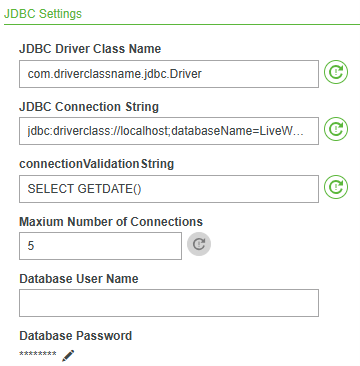
|
Field Name
|
Description
|
|---|---|
|
JDBC Driver Class Name
|
Depends on the driver being used.
|
|
JDBC Connection String
|
Defines the information needed to establish a connection with the database. Connection string formatting can be found at connectionstrings.com.
|
|
ConnectionValidationString
|
A simple query that verifies return values from the database (regardless of table names to be executed).
|
Queries and Commands Against the Database
Once you have the configuration set up, in services you can create SQLQueries and SQLCommands to enact upon the database you have connected to.
Passing Variables
As you build your query, use [[Parameter Name]] for parameters/variables substitution and <<string replacement >> for string substitution.
Example
DELETE FROM <> WHERE (FieldName = '[[MatchName]]');
DELETE FROM << TableName >> WHERE ( FieldName = [[MatchNumber]]);
|
|
It is extremely dangerous to use << ... >> string substitution, because it puts you at risk of SQL injection. We recommend you use caution when considering this method of parameter passing. However, to create a very dynamic set of queries, you must pass in the table names as << Name of the Table >>. Also, if you need to use the IN clause, your collection will need to be passed in with << Item1, Item2, Item3,>>
|