Licensing Subsystem Settings
To access Licensing Subsystem Monitoring from Composer:
1. Click Monitoring  .
.
.2. Go to Status.
3. Select Subsystems.
4. Click Licensing Subsystem Settings.
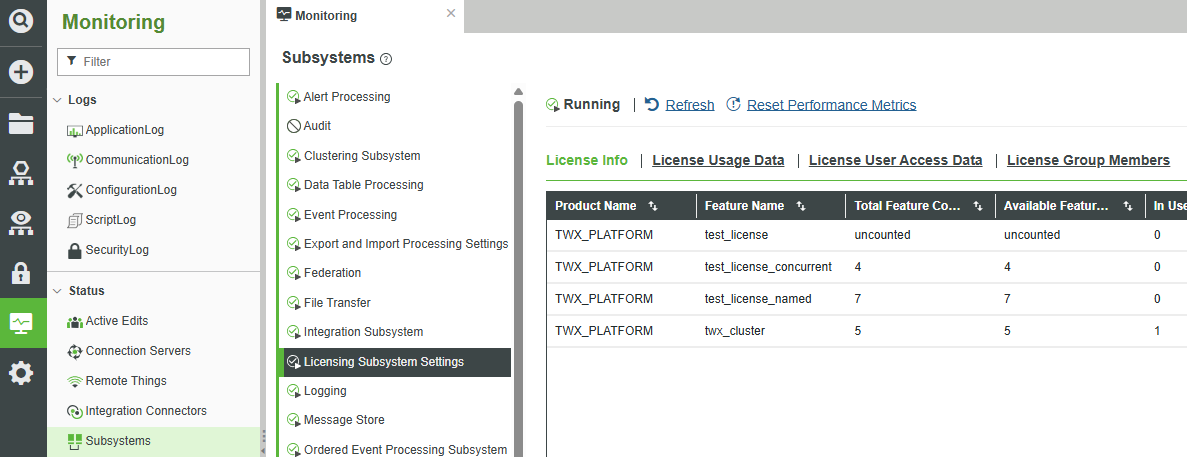
Within the Licensing Subsystem Settings, you can refresh or reset performance metrics using the options at the top of the Subsystems window. Optionally, you can click the Auto Refresh toggle to turn auto-refresh on or off.
Licensing Settings Tabs
The following tabs are available in the Licensing Subsystem Settings window:
License Info Tab
The License Info tab in the Licensing Subsystem Settings window provides a comprehensive overview of the current license installed on the ThingWorx server. This tab enables administrators to verify that the correct license is applied and that all required features are available for deployment.
The tab displays the following information:
• Product Name—The name of the product as specified in the license file.
• Feature Name—The licensed modules or capabilities such as Windchill Navigate or Manufacturing Apps
• Total Feature Count—The total number of features included in the license
• Available Feature Count—The number of features currently available for assignment
• In Use Feature Count—The number of features currently in use
• Version—The version of the license as retrieved from the license file
• Expiration Date—The date on which the license will expire
• Days Remaining—The number of days remaining until the license expires
• Is Enforced—Indicates whether the licensed feature is actively enforced
License Usage Data Tab
The License Usage Data tab logs recent license usage events. It is useful for monitoring recent activity, identifying peak usage periods, and detecting potential overuse or misuse of licenses. Since the tab displays only the latest 500 entries, it is best suited for short-term tracking.
The tab displays the following information:
• Key—A unique identifier of the user
• Source—The user who accessed the system
• Source Type—The type of source accessing the system, currently always set to User
• Timestamp—The date and time when access occurred
• Product Name—The name of the product as retrieved from the license file
• License Model—Indicates whether the license is free or paid
• Feature Name—The licensed modules or capabilities such as Windchill Navigate or Manufacturing Apps
• Transaction Type—The type of action performed in Composer, represented by the following codes:
◦ 1—Check-In
◦ 2—Check-Out
◦ 3—Shutdown not enforced
◦ 4—Shutdown enforced
◦ 5—Update
• In Use Feature Count—The number of features currently in use
License User Access Data Tab
The License User Access Data tab focuses on how users interact with licensed features, particularly for Named and Concurrent licenses. It is useful for compliance audits and for identifying users who are actively using assigned licenses. This information can support decisions about reallocating or purchasing additional licenses. Since the tab displays only the latest 500 entries, it is best suited for monitoring recent activity.
This tab includes the following information:
• Key—A unique identifier of the user
• Source—The user who accessed the system
• Source Type—The type of source accessing the system, currently always set to User
• Timestamp—The date and time when access occurred
• Product Name—The name of the product as retrieved from the license file
• License Model—Indicates whether the license is free or paid
• Feature Name—The licensed modules or capabilities such as Windchill Navigate or Manufacturing Apps
• Transaction Type—The type of action performed for Windchill Navigate groups, represented by the following codes:
◦ 1—When a named user is deleted from a group
◦ 2—When a named user is added to a group
◦ 5—When a named or concurrent user accesses a licensed mashup
• In Use Feature Count—The number of features currently in use
License Group Members Tab
The License Group Members tab displays the mapping of users to license groups. Each group corresponds to a specific license type or feature set. This helps manage access control and ensures that users are only consuming licenses they are entitled to. It also simplifies license tracking and reporting.
The tab includes the following information:
• Feature Name—The licensed modules or capabilities such as Windchill Navigate or Manufacturing Apps
• Group Name—The name of the user group, such as Navigate Users, Developers, or Administrators, along with a list of usernames assigned to each group