将 CGM 图像转换为 SVG
Servigistics InService 可将数据中的 CGM 图像转换为 SVG 图像。SVG 图像与 CGM 图像的质量相同,但是无需 Web 浏览器插件即可查看图像。
要将 CGM 图形转换为 SVG,必须拥有 CGM 至 SVG 转换器。转换发生于数据发布后但尚未载入系统前。Larson CGM Engine 转换器配备有安装插件 Servigistics InService。安装 Larson 时,如果已选择转换选项,则会自动将 CGM 图像转换为 SVG 图像。
如果您想要使用其他转换器,您必须将系统配置支持该转换器。转换器作为插件安装在 Publisher 服务器上。请按照以下步骤实施转换器:
1. 在自定义内容配置文件中定义一个名为 CustomCGMtoSVGConverter 的组件。
配置文件必须位于 INSERVICE_CONFIG/System/Config 目录中。可使用其中的现有文件,例如 customizedContext_3.conf.xml,但是建议创建一个新文件。文件名必须为 customizedContext_X.conf.xml,其中 X 可以为任意数字。尽管该组件可以包含在多个文件中,但是系统将始终使用数字最高的文件中的组件。
可在此组件中配置转换器特定特性。这些特性可由组件类通过以下方法访问:
public void configure(IConfiguration conf) throws ConfigurationException {
在配置文件中声明的配置参数可使用 Framework.jar 文件中 IConfiguration 界面内定义的各种方法访问,包路径为 com/enigma/sdk/framework/configuration。Framework.jar 文件位于 INSERVICE_HOME\InS_SW\SW\System\WildFly\modules\system\layers\base\com\ptc\e3c\main。
2. 通过扩展 SCEImageConverter.jar 文件中的类 com.enigma.imageConverter.ImageConverter,为 CGM 至 SVG 转换器创建一个 Java 类 (例如 CustomCGMtoSVGConverter)。
3. 使用三个字符串参数 (例如 input folder、output folder 和 output format) 创建名为 convertCGMToSVG 的方法。
此方法应将输入文件夹中的 CGM 图像转换为 SVG 图像,并将其放置在输出文件夹中。
4. 覆盖 execute(Map variables, String method) 方法。
如果方法名称为 convertCGMToSVG,则可从变量映射中提取下列参数:
//input folder
String input = (String) variables.get("input");
//output folder
String output = (String) variables.get("output");
//output format
String outputFormat = (String) variables.get("outputFormat")
接下来,调用使用上述参数在步骤 2 中定义的方法。预期位于输入文件夹中的 CGM 文件会转换为 SVG 文件,并放置在输出文件夹中。
5. 更新加载特定流程以进行图像转换。
6. 更新在 CGMtoSVGConverterSubFlow_PD.xml 子流的 ConvertCGMToSVGNode 节点中使用的 CGM 至 SVG 转换器组件和方法名称。
组件和方法名称必须与在步骤 2 到 4 中定义的相同。要调用的方法应在步骤 1 中创建的自定义类中进行定义。
实施转换器后,请按照以下步骤自定义 CGM 至 SVG 处理:
1. 在 INSERVICE_CONFIG/System/Config 目录下的 customizedContext_3.conf.xml 文件中添加以下特性:
<Component Name="CustomCGMToSVGConvertor">
<Creation Type="JavaObject">
<!-- class name with package -->
<Class>com.custom.imageConverter.CustomCGMToSVGConvertor</Class>
</Creation>
<Config>
<!-- Pass various configuration parameters for converter into the Component -->
<!-- User can define attributes as
<attribute1>value</attribute1>
<attribute2>value</attribute2>
-->
</Config>
</Component>
2. 更新 INSERVICE_CONFIG/System/Config/Flows/ContentManager 目录中的 contentManagerFlow_PD.xml 文件,以包含以下预处理节点:
<start-state name="start">
<transition to="runConvertImagesSubFlow"/>
</start-state>
<!-- Normalize sources -->
<node name="runCMPublishNormalizeSubFlow">
<action class="com.enigma.workflowengine.handlers.FlowActionHandler" config-type="handler">
<processDefinitionPath>${enigma.config.home}/System/Config/Flows/ContentManager/
cmPublishNormalizeFlow_PD.xml</processDefinitionPath>
</action>
<transition name="failure" to="End"/>
<transition name="success" to="runConvertImagesSubFlow"/>
<transition name="reenter" to="runCMPublishNormalizeSubFlow"/>
</node>
<node name="runConvertImagesSubFlow">
<action class="com.enigma.workflowengine.handlers.FlowActionHandler" config-type="handler">
<processDefinitionPath>${enigma.config.home}/System/Config/Flows/ContentManager/
convertImagesFlow_CustomPD.xml</processDefinitionPath>
<monitoringName>Run Convert Images Flow</monitoringName>
</action>
<transition name="failure" to="End"/>
<transition name="success" to="runCheckGlobalDiskSpaceFlow"/>
<transition name="reenter" to="runConvertImagesSubFlow"/>
</node>
<node name="runCheckGlobalDiskSpaceFlow">
<action class="com.enigma.workflowengine.handlers.FlowActionHandler" config-type="handler">
<processDefinitionPath>${enigma.config.home}/System/Config/Flows/ContentManager/
checkGlobalDiskSpaceFlow_PD.xml</processDefinitionPath>
<monitoringName>Check Disk Space</monitoringName>
</action>
<transition name="failure" to="End"/>
<transition name="success" to="runHandlePDFLinksFlow"/>
<transition name="reenter" to="runCheckGlobalDiskSpaceFlow"/>
</node>
<!-- Setup profile path.
<node name="getProfilePath">
<action class="com.enigma.workflowengine.handlers.ProcessActionHandler" config-type="handler">
<contextName>ContentManager.Application.BusinessLogic</contextName>
<componentName>PacketDeployer</componentName>
<methodName>getProfilePath</methodName>
<profileName>${profile_name}</profileName>
<monitoringName>Retrieve Profile Path</monitoringName>
</action>
<transition name="failure" to="End"/>
<transition name="success" to="runHandlePDFLinksFlow"/>
<transition name="reenter" to="getProfilePath"/>
</node>
-->
<node name="runHandlePDFLinksFlow">
<action class="com.enigma.workflowengine.handlers.FlowActionHandler" config-type="handler">
<processDefinitionPath>${enigma.config.home}/System/Config/Flows/ContentManager/
handlePDFLinksFlow_PD.xml</processDefinitionPath>
<monitoringName>Handle PDF Links</monitoringName>
</action>
<transition name="failure" to="End"/>
<transition name="success" to="TypeOfCMScriptDecision"/>
<transition name="reenter" to="runHandlePDFLinksFlow"/>
</node>
<decision name="TypeOfCMScriptDecision">
<transition name="failure" to="End"/>
<transition name="CreateCMScriptFlow" to="runCreateCMScriptFlow">
<condition expression="#{S1000D_publication != 'true'}" />
</transition>
<transition name="CreateCMScriptForS1000DFlow" to="runCreateCMScriptForS1000DFlow">
<condition expression="#{S1000D_publication == 'true'}" />
</transition>
</decision>
<node name="runCreateCMScriptFlow">
<action class="com.enigma.workflowengine.handlers.FlowActionHandler" config-type="handler">
<processDefinitionPath>${enigma.config.home}/System/Config/Flows/ContentManager/
createCMScriptFlow_PD.xml</processDefinitionPath>
<monitoringName>Create Script</monitoringName>
</action>
<transition name="failure" to="End"/>
<transition name="success" to="extractFeedIds"/>
<transition name="reenter" to="runCreateCMScriptFlow"/>
</node>
<node name="runCreateCMScriptForS1000DFlow">
<action class="com.enigma.workflowengine.handlers.FlowActionHandler" config-type="handler">
<processDefinitionPath>${enigma.config.home}/System/Config/Flows/ContentManager/
createCMScriptFlowForS1000D_PD.xml</processDefinitionPath>
<monitoringName>Create Script For S1000D</monitoringName>
</action>
<transition name="failure" to="End"/>
<transition name="success" to="extractFeedIds"/>
<transition name="reenter" to="runCreateCMScriptForS1000DFlow"/>
</node>
<!-- Copy contents before this node -->
<node name="extractFeedIds">
3. 向 INSERVICE_CONFIG/System/Config/Flows/ContentManager 目录下的 convertCGMToSVGFlow_PD.xml 文件中添加新特性:
为此,请先为文件此部分中的最后两行添加注释:
<node name="ConvertCGMToSVGNode">
<action class="com.enigma.workflowengine.handlers.ProcessActionHandler" config-type="handler">
<contextName>DataProcess.Application.BusinessLogic</contextName>
<componentName>CGMToSVGConverter</componentName>
<methodName>doConvertViaPTCTool</methodName>
接下来,在添加注释的行下方添加以下特性:
<componentName>CustomCGMToSVGConvertor</componentName>
<methodName>convertCGMToSVG</methodName>
4. 编译 CustomCGMToSVGConvertor.java 文件,然后复制 INSERVICE_HOME/InS_SW/SW/System/WildFly/modules/system/layers/base/com/ptc/e3c/main/SCEImageConverter.jar/com/ptc/sce/imageConverter 目录下的 CustomCGMToSVGConvertor.class 文件。
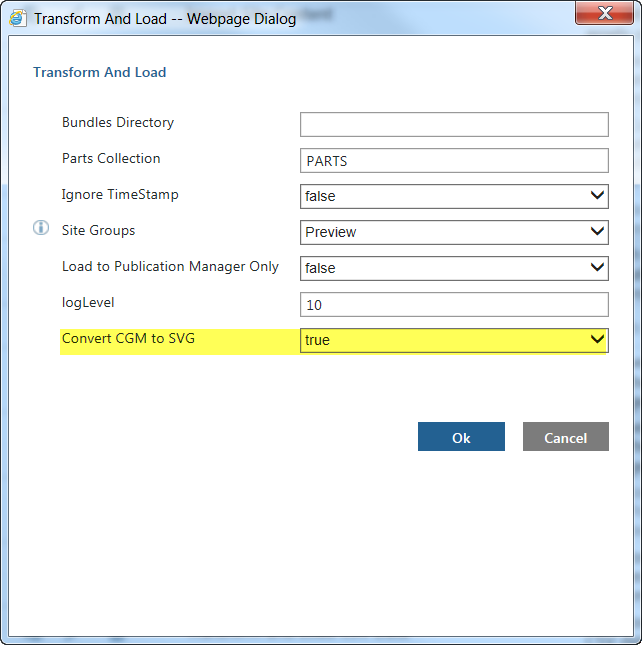
完成配置后,运行 Transform and Load 任务或 Transform and Load CSV Data 任务 (其中 Convert CGM to SVG 选项设置为 true) 来变换图形: