Código de ejemplo para integrar Servigistics InService con un sistema de pedidos
Este código de ejemplo para integrar Servigistics InService con un sistema de pedidos es solo para referencia. Este código se utiliza en un fichero de origen Java personalizado del delegado personalizado que implementa la interfaz com.ptc.sc.services.plugins.CommerceDelegate. Este código se puede modificar en función de los requisitos.
Código de ejemplo para obtener la clave y el valor de atributos simplificados de pedido
En el siguiente código de ejemplo, se obtienen la clave y el valor de los atributos simplificados para los pedidos de Servigistics InService mediante el método placeOrder(). Los atributos simplificados de pedido contienen el valor que se ha definido en el cuadro de diálogo Definir parámetros de compra:
@Override
public SCEOrder placeOrder (SCEOrder orderObj) throws Exception
{ //Code to fetch the SoftAttributes from Order Object and this information can be send to third party ordering system
Map<String, Object> existingAttrs = orderObj.getTypedAttrs();
if (existingAttrs != null) {
String dealarCode = existingAttrs.get("dealerCode") !=
null ? existingAttrs.get("dealerCode").toString() : null ;
String customer = existingAttrs.get("customer") !=
null ? existingAttrs.get("customer").toString() : null ;
String location = existingAttrs.get("location") !=
null ? existingAttrs.get("location").toString() : null ;
}
return orderObj;
}
Código de ejemplo para obtener la información del carro
En el siguiente código de ejemplo, se obtiene la información del carro de Servigistics InService mediante el método placeOrder(). Aquí se incluyen los metadatos del carro que se pide, por ejemplo, el nombre, las notas y la fecha (fecha y hora de creación y modificación):
@Override
public SCEOrder placeOrder (SCEOrder orderObj) throws Exception
{
String cartName = orderObj.getName();
String dealerName = orderObj.getDealer().getName();
String notes = orderObj.getNote();
return orderObj;
}
Código de ejemplo para obtener la información de elemento de carro
En el siguiente código de ejemplo, se obtiene la información de elemento de carro de Servigistics InService mediante el método placeOrder(). En este código se incluye información sobre los elementos (artículos) añadidos al carro, como el número de artículo y la cantidad:
@Override
public SCEOrder placeOrder (SCEOrder orderObj) throws Exception
{ //Code to get cartItem information
List<SCECartItem> cartItems = getCartItems(orderObj);
for (SCECartItem cartItem : cartItems) {
String partNumber;
String price;
String quantity;
String notes = cartItem.getNotes();
String description = cartItem.getDescription();
if (cartItem.getPricingmetadata() != null) {
JSONObject pricingInfo = new JSONObject
(cartItem.getPricingmetadata());
}
if (cartItem instanceof SCEInternalCartItem) {
SCEInternalCartItem internalCartItem =
(SCEInternalCartItem) cartItem;
SCENavLink sceNavLink =
internalCartItem.getE3cNavLink();
if (sceNavLink != null) {
SCENavItemHistoryMetadata historyMetaData = sceNavLink.getItemHistoryMetadata();
if (historyMetaData != null) {
JSONObject part =
historyMetaData.getJSONObject();
partNumber = part.getString
("partNumber");
}
}
}else {
SCEExternalCartItem externalCartItem =
(SCEExternalCartItem) cartItem;
partNumber = externalCartItem.getPartNumber();
}
}
return orderObj;
}
}
Código de ejemplo para obtener los detalles de pedido del sistema de pedidos
En el siguiente código de ejemplo, se obtienen los detalles de atributo personalizado orderStatus de un sistema de pedidos de terceros mediante el método placeOrder():
@Override
public SCEOrder placeOrder (SCEOrder orderObj) throws Exception
{ // Code to Set any additional information like OrderStaus
that is return back from the third party order system
Map<String, Object> existingAttrs = orderObj.getTypedAttrs();
if (existingAttrs == null) {
existingAttrs = new HashMap<String, Object>();
existingAttrs.put("orderStatus", "Order Success");
orderObj.setTypedAttrs(existingAttrs);
} else {
existingAttrs.put("orderStatus", "Order Success");
}
return orderObj;
}
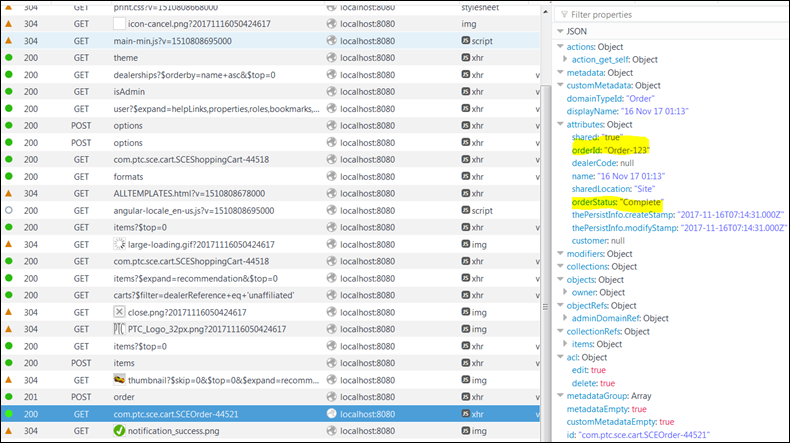
En la siguiente respuesta para un pedido realizado se muestran los atributos orderId y orderStatus en un fichero JSON:
Para mostrar atributos personalizados de un sistema de pedidos de terceros en la página
Detalles de un pedido en
Servigistics InService, consulte la sección "Visualización de atributos personalizados en la página de detalles de un pedido" en
Personalización de Servigistics InService con la información del sistema de pedidos de terceros.