CGM イメージから SVG への変換
CGM グラフィックを SVG に変換するには、CGM から SVG へのコンバータが必要です。この変換は「Publish to Preview」タスクが実行されたときに行われます。
このコンバータは Publisher サーバー上にプラグインとしてインストールされています。このコンバータを実装するには以下のステップに従います。
1. カスタムコンテンツコンフィギュレーションファイルで CustomCGMtoSVGConverter という名前のコンポーネントを定義します。
このコンフィギュレーションファイルは <INSERVICE_コンフィギュレーション>/System/Config ディレクトリに配置する必要があります。そこにある customizedContext_3.conf.xml などの既存のファイルを使用できますが、新しいファイルを作成することをお勧めします。このファイルには customizedContext_X.conf.xml (ここで X は任意の番号) という名前を付ける必要があります。このコンポーネントは複数のファイルに作成できますが、最も番号が大きいファイルのコンポーネントが必ず使用されます。
このコンポーネントでコンバータ固有のプロパティを設定できます。これらのプロパティは以下のメソッドを介してコンポーネントクラスにアクセスできます。
public void configure(IConfiguration conf) throws ConfigurationException {
このコンフィギュレーションファイルで宣言されているコンフィギュレーションパラメータには、Framework.jar (パッケージパス com/enigma/sdk/framework/configuration) に存在する IConfiguration インタフェースで定義されている各種メソッドを使用してアクセスできます。
2. ファイル SCEImageConverter.jar にあるクラス com.enigma.imageConverter.ImageConverter を拡張することによって、CGM から SVG へのコンバータ用の Java クラス (CustomCGMtoSVGConverter など) を作成します。
3. input folder、output folder、output format などの 3 つの文字列パラメータを持つ convertCGMToSVG という名前のメソッドを作成します。
このメソッドは、入力フォルダ内の CGM イメージを SVG イメージに変換し、これらを出力フォルダ内に配置します。
4. execute(Map variables, String method) メソッドを上書きします。
メソッド名が convertCGMToSVG である場合、この変数マップから以下のパラメータを抽出できます。
//input folder
String input = (String) variables.get("input");
//output folder
String output = (String) variables.get("output");
//output format
String outputFormat = (String) variables.get("outputFormat")
次に、ステップ 2 で定義したメソッドを上記のパラメータを付けて呼び出します。入力フォルダ内の CGM イメージが SVG イメージに変換されて出力フォルダ内に配置されることが求められます。
5. イメージ変換のためのロード固有のフローを更新します。
6. CGMtoSVGConverterSubFlow_PD.xml サブフローの ConvertCGMToSVGNode ノードで使用されている CGM から SVG へのコンバータのコンポーネントとメソッド名を更新します。
コンポーネントとメソッド名はステップ 2 と 4 で定義されているものと同じでなければなりません。呼び出すメソッドは、ステップ 1 で作成したカスタムクラスで定義されている必要があります。
このコンバータを実装した後、以下の手順に従って、CGM から SVG への処理をカスタマイズします。
1. <INSERVICE_コンフィギュレーション>/System/Config ディレクトリにあるファイル customizedContext_3.conf.xml に以下のプロパティを追加します。
<Component Name="CustomCGMToSVGConvertor">
<Creation Type="JavaObject">
<!-- class name with package -->
<Class>com.custom.imageConverter.CustomCGMToSVGConvertor</Class>
</Creation>
<Config>
<!-- Pass various configuration parameters for converter into the Component -->
<!-- User can define attributes as
<attribute1>value</attribute1>
<attribute2>value</attribute2>
-->
</Config>
</Component>
2. <INSERVICE_コンフィギュレーション>/System/Config/Flows/ContentManager ディレクトリにあるファイル contentManagerFlow_PD.xml を更新して以下の前処理ノードを追加します。
<start-state name="start">
<transition to="runConvertImagesSubFlow"/>
</start-state>
<!-- Normalize sources -->
<node name="runCMPublishNormalizeSubFlow">
<action class="com.enigma.workflowengine.handlers.FlowActionHandler" config-type="handler">
<processDefinitionPath>${enigma.config.home}/System/Config/Flows/ContentManager/
cmPublishNormalizeFlow_PD.xml</processDefinitionPath>
</action>
<transition name="failure" to="End"/>
<transition name="success" to="runConvertImagesSubFlow"/>
<transition name="reenter" to="runCMPublishNormalizeSubFlow"/>
</node>
<node name="runConvertImagesSubFlow">
<action class="com.enigma.workflowengine.handlers.FlowActionHandler" config-type="handler">
<processDefinitionPath>${enigma.config.home}/System/Config/Flows/ContentManager/
convertImagesFlow_PD.xml</processDefinitionPath>
<monitoringName>Run Convert Images Flow</monitoringName>
</action>
<transition name="failure" to="End"/>
<transition name="success" to="runCheckGlobalDiskSpaceFlow"/>
<transition name="reenter" to="runConvertImagesSubFlow"/>
</node>
<node name="runCheckGlobalDiskSpaceFlow">
<action class="com.enigma.workflowengine.handlers.FlowActionHandler" config-type="handler">
<processDefinitionPath>${enigma.config.home}/System/Config/Flows/ContentManager/
checkGlobalDiskSpaceFlow_PD.xml</processDefinitionPath>
<monitoringName>Check Disk Space</monitoringName>
</action>
<transition name="failure" to="End"/>
<transition name="success" to="runHandlePDFLinksFlow"/>
<transition name="reenter" to="runCheckGlobalDiskSpaceFlow"/>
</node>
<!-- Setup profile path.
<node name="getProfilePath">
<action class="com.enigma.workflowengine.handlers.ProcessActionHandler" config-type="handler">
<contextName>ContentManager.Application.BusinessLogic</contextName>
<componentName>PacketDeployer</componentName>
<methodName>getProfilePath</methodName>
<profileName>${profile_name}</profileName>
<monitoringName>Retrieve Profile Path</monitoringName>
</action>
<transition name="failure" to="End"/>
<transition name="success" to="runHandlePDFLinksFlow"/>
<transition name="reenter" to="getProfilePath"/>
</node>
-->
<node name="runHandlePDFLinksFlow">
<action class="com.enigma.workflowengine.handlers.FlowActionHandler" config-type="handler">
<processDefinitionPath>${enigma.config.home}/System/Config/Flows/ContentManager/
handlePDFLinksFlow_PD.xml</processDefinitionPath>
<monitoringName>Handle PDF Links</monitoringName>
</action>
<transition name="failure" to="End"/>
<transition name="success" to="TypeOfCMScriptDecision"/>
<transition name="reenter" to="runHandlePDFLinksFlow"/>
</node>
<decision name="TypeOfCMScriptDecision">
<transition name="failure" to="End"/>
<transition name="CreateCMScriptFlow" to="runCreateCMScriptFlow">
<condition expression="#{S1000D_publication != 'true'}" />
</transition>
<transition name="CreateCMScriptForS1000DFlow" to="runCreateCMScriptForS1000DFlow">
<condition expression="#{S1000D_publication == 'true'}" />
</transition>
</decision>
<node name="runCreateCMScriptFlow">
<action class="com.enigma.workflowengine.handlers.FlowActionHandler" config-type="handler">
<processDefinitionPath>${enigma.config.home}/System/Config/Flows/ContentManager/
createCMScriptFlow_PD.xml</processDefinitionPath>
<monitoringName>Create Script</monitoringName>
</action>
<transition name="failure" to="End"/>
<transition name="success" to="extractFeedIds"/>
<transition name="reenter" to="runCreateCMScriptFlow"/>
</node>
<node name="runCreateCMScriptForS1000DFlow">
<action class="com.enigma.workflowengine.handlers.FlowActionHandler" config-type="handler">
<processDefinitionPath>${enigma.config.home}/System/Config/Flows/ContentManager/
createCMScriptFlowForS1000D_PD.xml</processDefinitionPath>
<monitoringName>Create Script For S1000D</monitoringName>
</action>
<transition name="failure" to="End"/>
<transition name="success" to="extractFeedIds"/>
<transition name="reenter" to="runCreateCMScriptForS1000DFlow"/>
</node>
<!-- Copy contents before this node -->
<node name="extractFeedIds">
3. <INSERVICE_コンフィギュレーション>/System/Config/Flows/ContentManager ディレクトリにあるファイル convertCGMToSVGFlow_PD.xml に新しいプロパティを追加します。
このためには、最初にこのファイルの以下の部分にある最後の 2 行をコメント化します。
<node name="ConvertCGMToSVGNode">
<action class="com.enigma.workflowengine.handlers.ProcessActionHandler" config-type="handler">
<contextName>DataProcess.Application.BusinessLogic</contextName>
<componentName>CGMToSVGConverter</componentName>
<methodName>doConvertViaPTCTool</methodName>
次に、コメント化した行の下に以下のプロパティを追加します。
<componentName>CustomCGMToSVGConvertor</componentName>
<methodName>convertCGMToSVG</methodName>
4. ファイル CustomCGMToSVGConvertor.java をコンパイルし、<INSERVICE_ホーム>/InS_SW/SW/System/WildFly/modules/system/layers/base/com/ptc/e3c/main/SCEImageConverter.jar/com/ptc/sce/imageConverter ディレクトリにあるファイル CustomCGMToSVGConvertor.class をコピーします。
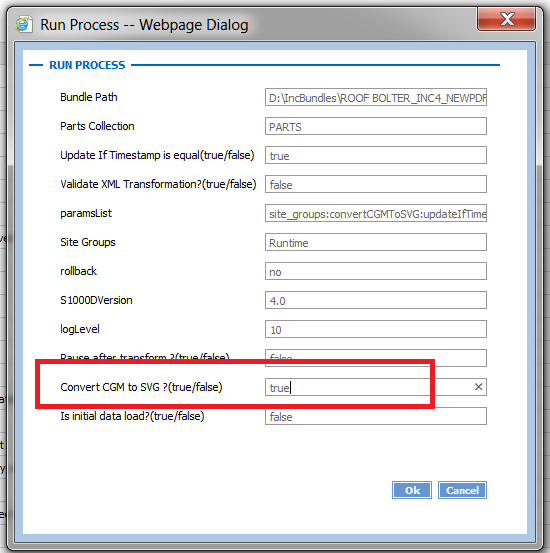
設定が完了した後、以下のように「Convert CGM to SVG」オプションを「true」に設定して「Transform and Load with Collection」タスクまたは「Transform and Load CSV Data」タスクを実行することで、グラフィックを変換します。