Configuring Applicability Rules for Observation
You can configure applicability rules to determine when an observation is relevant to an investigation. Applicability rules compare investigation fields (source) with observation fields (target) to control when observations are considered applicable.
|
Prerequisites
|
|---|
|
Ensure the fields you want to use for applicability rules exist on both the Investigation and Observation objects. Only fields available on both objects can be selected when configuring rules.
|
To configure applicability rules for observation:
1. Go to Setup > Investigations > Product Applicability Rules.
The Product Applicability Rules page is displayed. By default, the Observation tab is selected.
2. Click Add Rule.
3. In the Investigation (Source) field, select the field from the Investigation that you want to compare (For example, Case > Account ID).
 |
A right arrow (→) appears next to the object name in the Investigation (Source) field if there are additional fields to select within that object. Click the arrow to expand and choose the specific field. If no arrow appears, select the available field directly.
|
4. In the Applicable Observation (Target) field, select the field from the Observation object (such as Product, Product Line, or Product Family) that the system compares with the selected Investigation (Source) field to determine whether the Observation is applicable.
The comparison operator is set to Equals and cannot be changed.
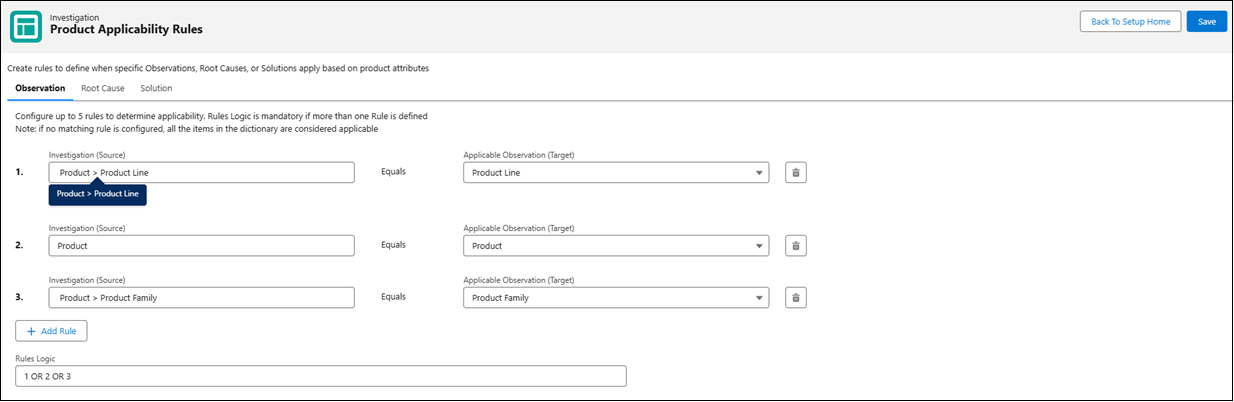
5. To add more rules, click Add Rule and repeat steps 2–4.
|
|
You can configure up to five rules.
|
6. If you add more than one rule, enter a valid logic expression in the Rules Logic field. For example, (1 AND 2) OR 3.
|
|
After the first rule is saved, the Rules Logic field automatically displays 1. For every additional rule, the Rules Logic field displays an error until a valid logic expression is entered. This error must be resolved before saving.
|
7. To delete an applicability rule, click the Delete Rule icon next to the Applicable Observation (Target) field.
8. Click Save to apply the changes.
|
|
Any changes made will only be applied when you click Save. Navigating away without saving will discard your changes.
|
The rule is saved and used to determine when observations apply to investigations.
An Observation called Engine Failure should apply if the Product Line is Engine, the Product is Turbo Engine X100, or the Product Family is Power Systems.
• Rule 1: Investigation (Source): Product → Product Line → Applicable Observation (Target): Product Line
• Rule 2: Investigation (Source): Product → Applicable Observation (Target): Product
• Rule 3: Investigation (Source): Product → Product Family → Applicable Observation (Target): Product Family
• Rules Logic: 1 OR 2 OR 3
Result:
• If Product Line = Engine, the Observation Engine Failure is applicable.
• If Product = Turbo Engine X100, the Observation is also applicable.
• If Product Family = Power Systems, the Observation is also applicable.
• Otherwise, the Observation does not appear.
|
|
The system considers all observations as applicable if no applicability rules exist.
|