Using Agent Skills
 |
This feature is currently available as a beta release.
|
Agent skills perform calculations and run database queries. You can use them to automate routine tasks, improve efficiency, and ensure consistent and reliable outcomes.
You can use the available AI agent skills by entering a forward slash (/) in the AI Action composer. You can also integrate agent skills into any Service Flow Manager (SFM) transaction that you configure in the AI console. You can configure and install agent skills by specifying their names, types, input parameters, and expected outputs. For more information, see Installing Agent Skills.
|
Prerequisites
|
|---|
|
Before you use agent skills ensure the following:
• The Agent Skills are installed and configured in the AI Console. For more information, see Installing AI Agent Skills.
• The Agent Skills must be authored and published in the AI Console with required input parameters and instructions.
• The data sources and records included in the instructions are available and accessible.
|
To use agent skills in AI action, perform the following steps.
1. Open AI Actions. The list of AI Actions is displayed.
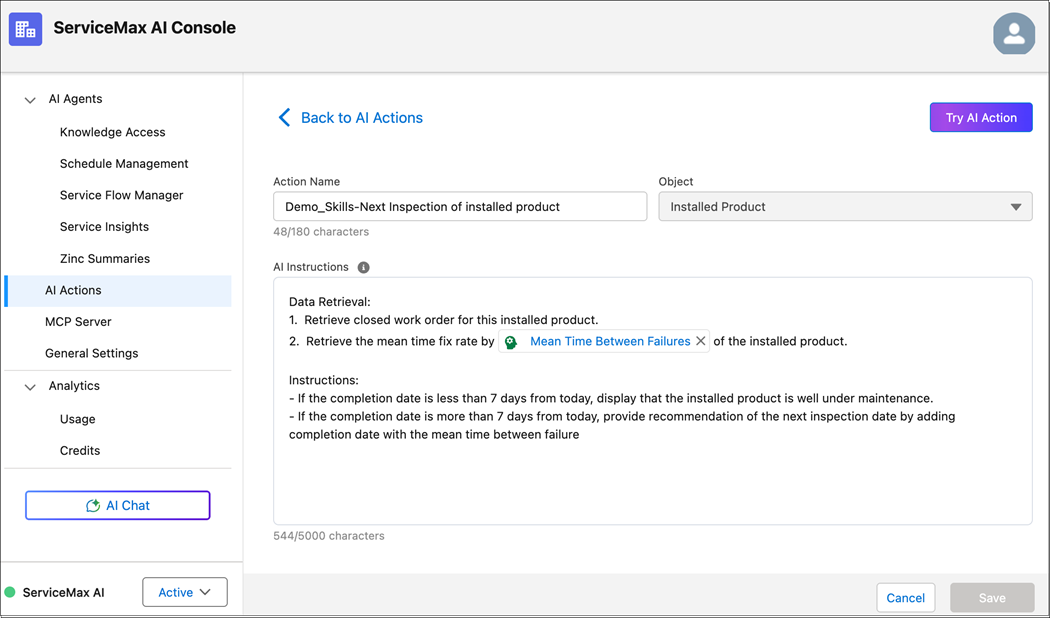
2. Select the AI action in which you want to configure agent skills. For example, select Demo_Skills-Next Inspection of Installed Product. The AI Instructions window is displayed.
3. Enter the instructions for the AI Action.
|
|
You can enter up to 5,000 characters. The limit includes all characters, such as spaces, line breaks, and special characters.
|
4. To insert an agent skill, enter a forward slash (/) in the AI instruction window.
A drop-down of available agent skills is displayed.
5. From the drop-down, select one or more agent skills. The drop-down closes automatically, and the reference is inserted at the current cursor location or at the end of the text if no cursor is active.
|
|
You can use more than one agent skill in the same AI action.
|
6. Click Save.
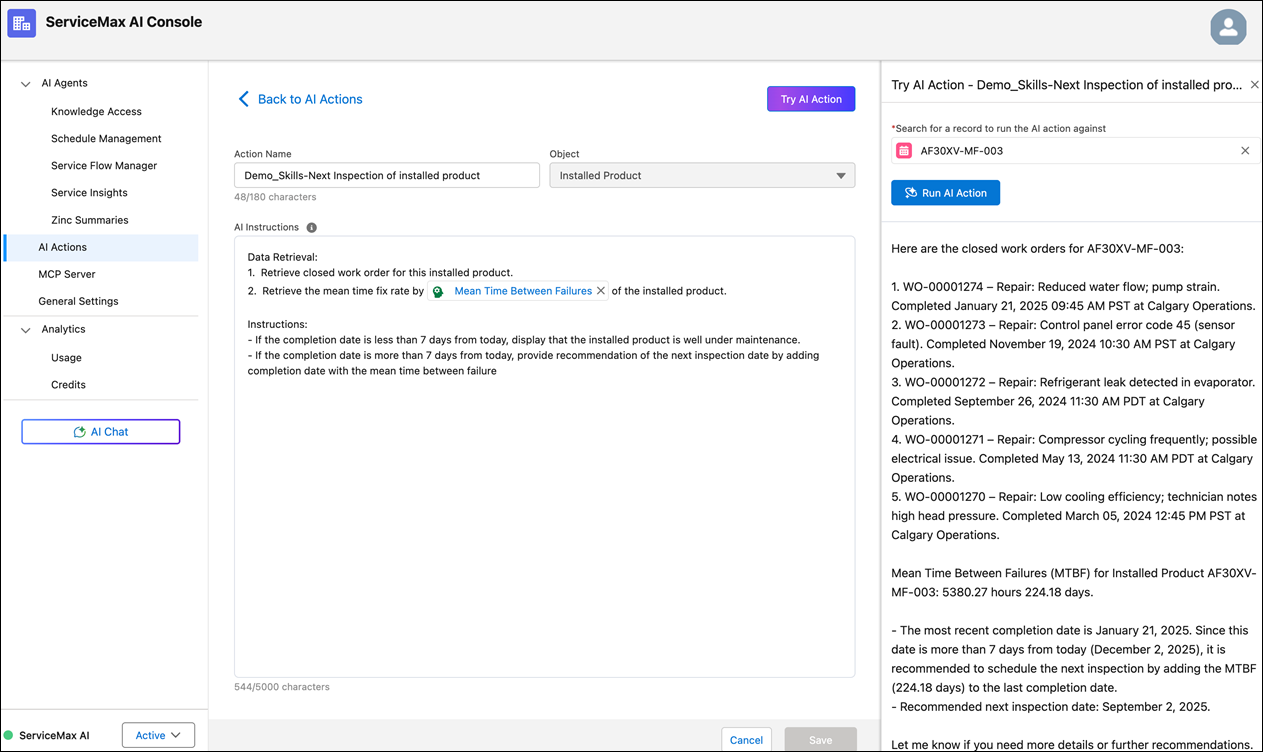
7. Click Try AI Action. The Try AI Action window opens, where you can search for an Installed Product record. For example, select AF30XV-MF-003.
8. Click Run AI Action. This displays the result of the AI Action. For example, it calculates the mean time between failures for the selected installed product.

|
|
To calculate the Mean Time Between Failure, the code executes the following mathematical formula for the relevant work orders. Mean Time = Time from Date of Installed / Number of Closed Repair Work Orders
Mean Time: Time from date of installed / No. of closed repair Work Orders
These details are taken from the Work Orders linked to the Installed Product.
Closed Work orders: 5
Scheduled Dates:
• 3/5/2024
• 5/13/2024
• 9/26/2024
• 11/19/2024
• 1/21/2025
Completed Dates:
• 3/5/2024, 1:26 PM
• 5/13/2024, 1:15 PM
• 9/26/2024, 11:15 PM
• 11/19/2024, 11:30 PM
• 1/21/2025, 10:14 AM
Installed date: 11/08/2022
Number of days from the time of installation:
• 1079 days, 17 hours, 30 minutes, and 0 second
• 1,079.7292 days
• 25,913.5 hours
• 25,913.5 / 5 = 5,182.7
|
|
|
The AI Action appears in the Skill’s Where Used column if an AI Action refers to a skill implying that the skill is marked as In Use.
|