使用“重新同步变更包”回填列表
如果要应用的变更包与其他变更包关联,则“重新同步变更包”命令将向您显示一个回填列表,其中包含所需的所有变更包。下列示例说明了回填列表在“重新同步变更包”命令中的工作方式。
 |
• 重新同步子项目操作时,不会使用回填列表。您必须明确指定要重新同步的子项目操作所在的所有变更包,或者为“子项目传播”选项选择 Implicitly。
• 在回填列表修订期间,如果变更包所含的项来自不同服务器,则这些变更包会被忽略。修订版本仍会应用。任何冲突的变更都必须由用户手动解决。
|
使用回填列表来包括必需的以前修订版本
下列示例说明了如何在 Aurora 项目 (Aurora_Project.pj) 的主干开发中简化“重新同步变更包”命令的应用。
项目成员 tool.c 包含用于项 24 的错误修复,并且通过变更包 (CP) 24:1 与文件 tool.c(修订版本 1.7)关联。
开发人员要获取用于修复错误的更改,并在沙盒中应用这些更改。在开发人员的沙盒中,tool.c 的修订版本为 1.2。
为了在沙盒中应用错误修复,开发人员会使用 si resynccp 命令,按照如下所示应用变更包 24:1
si resynccp -S c:/Aurora_Project/project.pj 24:1
Applying change packages...
24:1
The following warnings have occurred:
-------------------
The change package(s)
20:1 -- tool.c(1.3)
21:1 -- tool.c(1.4)
22:1 -- tool.c(1.5)
23:1 -- tool.c(1.6)
are required in order to apply this list of change
packages. They will be automatically added to the list,
since the backfill option is set to Entire Change
Package(cp). --------------------
*** The following set of operations will be performed:
Project: f:/Aurora_Project/project.pj
Sandbox: c:\Aurora_Sandbox\project.pj
Member tool.c: resynchronize to Revision 1.7
 Are you sure you wish to proceed? [yn]<n>: y
在这种情况下,“重新同步变更包”命令会将沙盒中 tool.c 的工作文件修订版本从 1.2 更新至 1.7。这可通过将 tool.c 1.7 检出到沙盒来完成。从修订版本 1.3 到 1.6 的更改已包含在所检出的文件中。
使用回填列表来合并先前的修订版本
您可以合并回填列表中显示的部分或所有必需的更改。
现在,主项目 Aurora_Project.pj 包括针对项目成员 tool.c 的其他错误修复。项 23 会处理该错误修复,并且通过变更包 23:1 与文件 tool.c(修订版本 1.6)关联。
开发人员要获取用于修复错误的更改,并在沙盒中应用这些更改。在开发人员的沙盒中,tool.c 的修订版本为 1.2。
使用“重新同步变更包”命令选取特定变更包
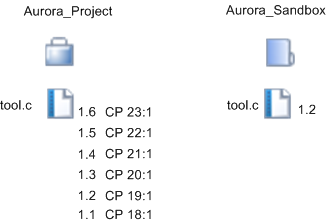
为了选取错误修复,开发人员会在沙盒中使用 si resynccp 命令。开发人员想要确定要包含在操作中的特定变更包,因此,他/她会将回填选项设置为“要求指定”(--backfill=ask)。该命令运行如下:
si resynccp -S c:/Aurora_Sandbox/project.pj --backfill=ask 23:1
Applying change packages...
23:1
*** The following list of change packages are used by revisions
before the revision that you require. Each change package is
given, along with the revisions which require them:
20:1 -- tool.c(1.3)
21:1 -- tool.c(1.4)
22:1 -- tool.c(1.5)
Reply with:
   y to pick up all these change packages, along with their
   associated changes,
s to skip all these revisions and merge around them (default)
c to cancel the command
or a space separated list of change package identifiers from
the list given to be *removed* from the list [y|s|c|#...]?
|
|
在命令行界面中从回填列表选择变更包时,请输入要从重新同步操作中“排除”的变更包编号;在 GUI 中,请选择要“包括”在重新同步操作中的变更包。
|
开发人员决定合并所有中间变更包,并选择 s(跳过)。命令会继续执行,如下所示:
The following warnings have occurred:
-------------------
The following members require a merge to be performed:
tool.c
You have not specified a change package, so merged members will
not be locked.
--------------------
*** The following set of operations will be performed:
   Project: f:/Aurora_Project/project.pj
   Sandbox: c:\Aurora_Sandbox\project.pj
      Member tool.c: merge around differences: picking up revisions
      1.2 through 1.6, excluding revisions 1.3, 1.4, 1.5, by checking
      out Revision 1.2 into the working file, and merging in the
      differences between Revision 1.6 and Revision 1.2 with the
      differences between Revision 1.5 and Revision 1.3.
Are you sure you wish to proceed? [yn](n): y
如果选择继续,则您会收到一则通知,其中列出已处理的更新以及任何未处理的更新。
“重新同步变更包”会更新 main.c 的工作文件修订版本,具体方法是:检出修订版本 1.2,然后将 1.2 和 1.6 之间的差异合并到工作文件中。中间修订版本不会添加至沙盒,因为已选择“跳过”选项。由于重新同步操作不使用传播变更包来记录更改,因此不会锁定合并成员。