Dashboard Layout Designer: User Interface Components
The following illustration shows the main features of the dashboard layout designer interface.
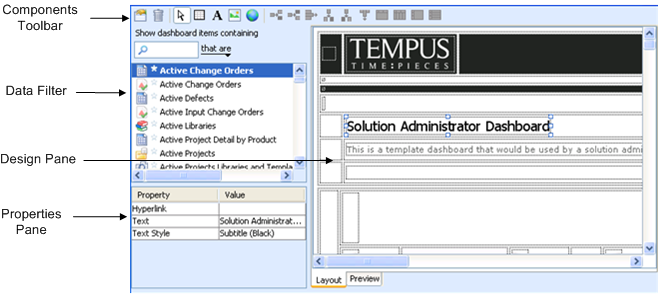
The dashboard layout designer incorporates drag-and-drop functionality to help you add components to a dashboard. You can drag a component from the data filter or add a component using one of the toolbar buttons in the components toolbar. You can modify the properties of specific components in the properties pane.
The Dashboard Layout Designer includes the following user interface components:
|
Component
|
Description
|
|---|---|
|
Components Toolbar
|
Includes tools to design a dashboard. For example:
• modify general properties and default styles for text, cells, and grids
• select components of template, including grids, cells, and labels.
• add new grid to dashboard
• insert image into cell
• inserts URL link into cell
Certain tools can work in two modes:
• clicking the tool to operate in the selected mode, for example, clicking the text tool to insert a text label into a cell
• dragging the tool onto the design pane to add the selected component, for example, dragging the image tool to insert an image into a cell
|
|
Data Filter
|
Allows you to locate and select objects to insert into the dashboard, such as charts, queries, and reports.
|
|
Design Pane
|
Area for designing your dashboard (using images, links, and tables).
|
|
Properties Pane
|
Displays properties for the selected object.
|