Server Disconnection and Idle Timeout Handling in PTC RV&S
Starting release PTC RV&S 13.4.0.0, disconnections from the proxy server or the main server, as well as disconnections between the proxy and the main server, are displayed with a glass pane effect. The views which lose connection to the server display a glass pane with the Lost connection to server... message. In this scenario, any mouse or keyboard action within the launched views is blocked.
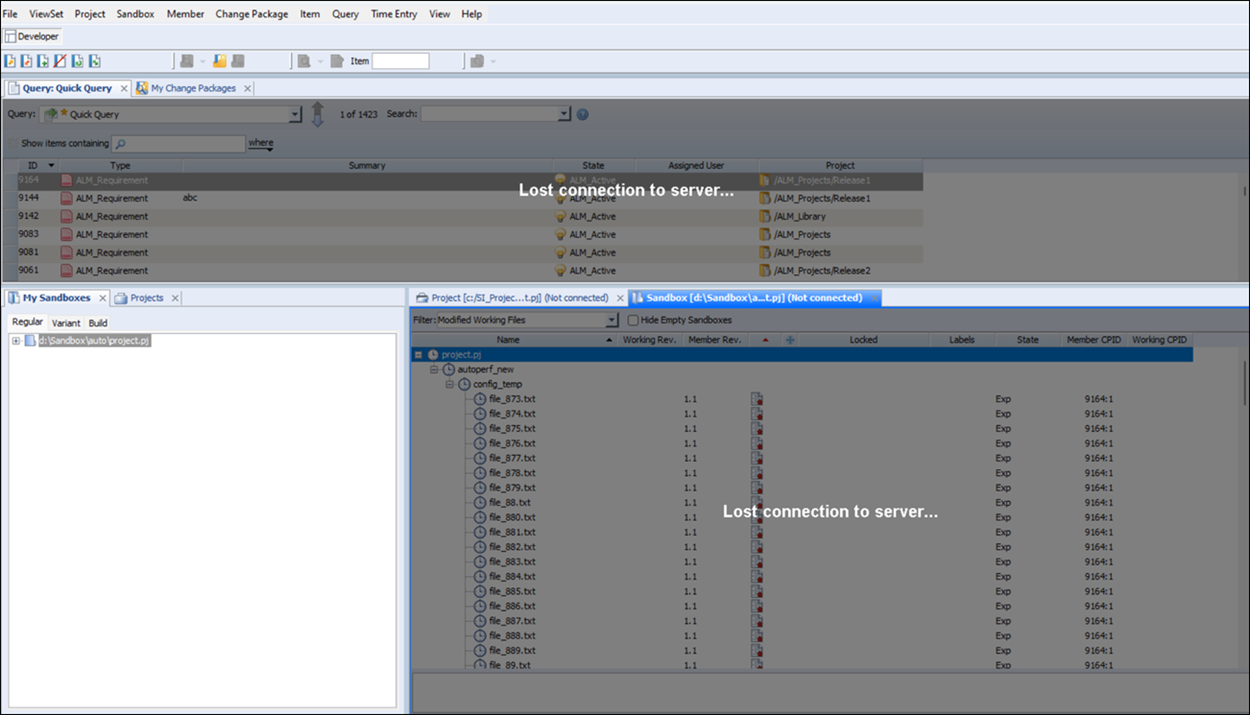
However, you can still interact with views connected to other servers that did not disconnect or with views like the My Sandboxes view, which do not require an active server connection. Once the server connection is re-established, the views are notified about the server's availability and glass pane is removed automatically, although it may take some time for the views to fully restore the server connection. You can also try to re-establish the connection with the server, by invoking actions from the menu bar or icons. Alternatively, you can use CLI commands such as si connect or im connect to reconnect to the server.
In case of idle disconnect, no glass pane or reload button is displayed. All the launched views continue to render. Clicking inside the already launched views or launching a new view or new command re-establishes the server connection.
Server Disconnections and Idle Timeouts in Servers Configured with OIDC
In case the server has been configured for OIDC, the following scenarios are applicable for server disconnection and idle timeouts:
Server disconnection
If the main server has been configured for OIDC authentication scheme, upon server disconnection, all views sharing the server connection display a Reload button with a message informing you that the server connection has been terminated. Upon clicking Reload, you are redirected to your browser session.
Idle Timeout
If the main server has been configured for OIDC authentication scheme, upon idle timeout, all views sharing the server connection display a Reload button with a message informing you that the server connection has been terminated due to inactivity. Upon clicking Reload, you are redirected to your browser session for authentication.