About the Relationship Viewer
The Relationship Viewer in the Refreshed Web Interface provides the ability to view relationships for one or more items in a tree structured hierarchy. On navigating to the Relationship Viewer of an item, the first level of relationships for the item are displayed in a tabular format. The RELATIONSHIP, TYPE, TITLE, STATE, PROJECT, and ACTIONS columns are displayed by default.
Options are available to expand and collapse related items, configure columns, and select the type of relationships to be displayed. For conceptual information on relationships, see What are item Relationships?.
A Relationship Viewer looks similar to the following:
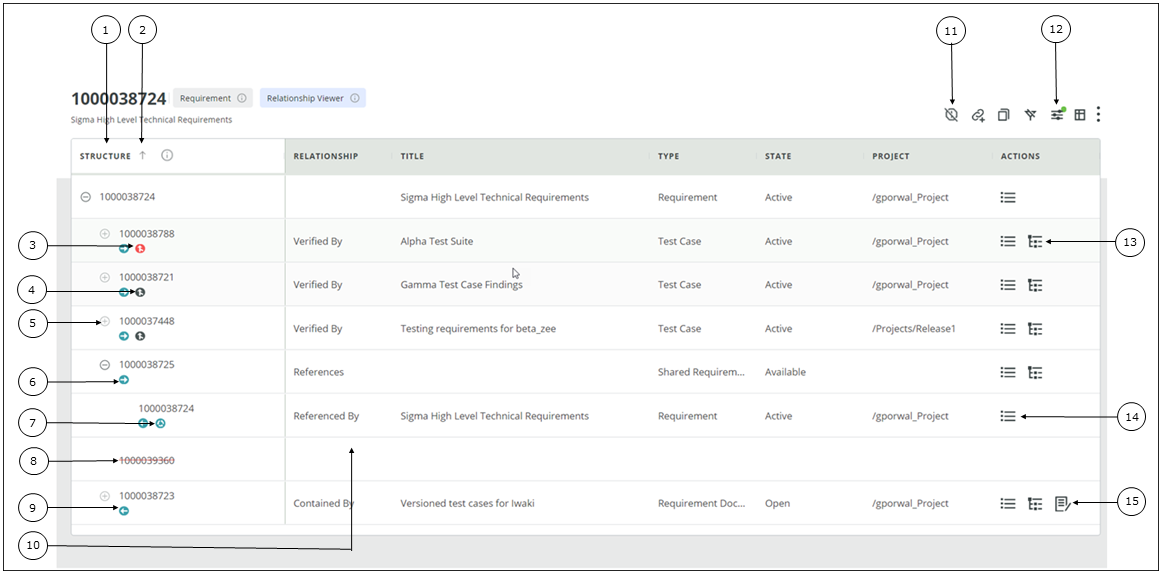
1. Tree structured hierarchy for relationships
2. Click to sort by relationship direction
3. Suspect trace relationship
4. Trace relationship
5. Click to expand related item node
6. Downstream (forward) relationship
7. Relationship loop
8. Id struck out for inaccessible related item
9. Upstream (backward) relationship
10. Blank row for inaccessible related item
11. Click to clear the suspects
12. Click to regenerate the relationship view
13. Click to open the Relationship Viewer
14. Click to open the Item View
15. Click to open in DocStudio
The following details are presented once you launch the Relationship Viewer from one of the launch points.
|
User Interface Component
|
Description
|
||
|---|---|---|---|
 |
Indicates that the item is being viewed in the Relationship Viewer
|
||
 |
Displays the tool tip for the Relationship Viewer.
|
||
 |
Sorts by relationship direction
The tree can contain downstream or upstream or both relationships. By default, downstream relationships are sorted first in the order.
|
||
 |
Expands the tree to show the relationships for an item. When you expand at the root level, all relationships for the root item are displayed.
|
||
 |
Collapses the tree and hides the relationships for an item. When you collapse at the root level, all relationships for the root item are hidden.
|
||
 |
Indicates a forward or downstream relationship.
|
||
 |
Indicates a backward or upstream relationship.
|
||
 |
Indicates a trace relationship.
|
||
 |
Indicates a suspect trace relationship.
|
||
 |
Indicates the item contains a relationship loop.
A relationship loop occurs when an item has both a forward and a backward relationship with another item within the same relationship hierarchy.
|
||
 |
Clears the suspect traces for selected items. Click to open the Clear Suspect for Item window. Select the items from which you want to clear suspects and click Clear Suspect.
|
||
 |
Creates a related item for the selected item. For more information, see Creating a Related Item.
|
||
 |
Creates a copy of the selected item. For more information, see About copying an Item.
|
||
 |
Resets all the applied column filters. For more information, see About the Relationship Viewer
|
||
 |
Opens the Regenerate Relationship View window. For more information, see Regenerating the Relationship View.
|
||
 |
Opens the Column Manager. For more information, see Configuring columns for the Relationship Viewer.
|
||
 |
The following options are available under the vertical ellipsis:
• Reports: Run item report, difference report, and historical report. For more information, see Running a Report.
• Custom Actions:
|

To copy or export items from the Relationship Viewer, see Copying and Exporting Data.
 |
The relationship view is reloaded once new columns are configured or when a relationship view is regenerated.
|
Related Topics