Cross-cutting Perspective View
The cross-cutting perspective view lists the contents of the cross-cutting perspective in a tabular format. Options on the view help you sort, search, and filter data. You can apply these options to quickly search and organize your data.
A cross-cutting perspective view appears similar to the following:
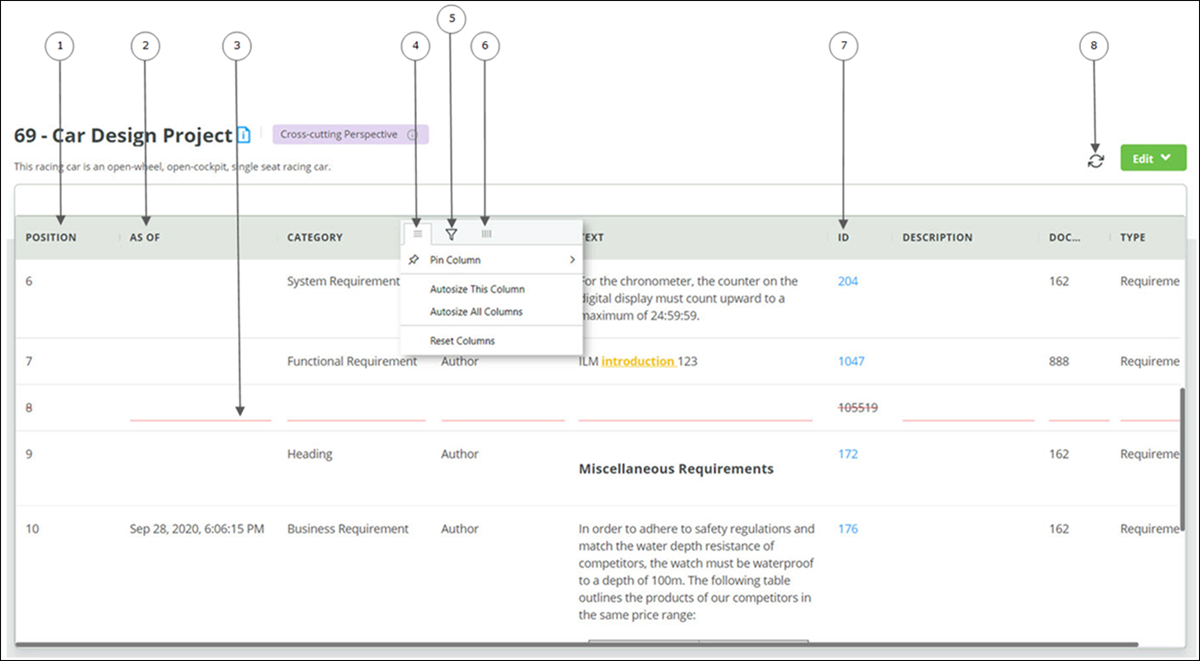
1. Position of content in the cross-cutting perspective
2. asOf details of content
3. Invalid content indicated with strikethrough
4. Pin column or autosize column width
5. Filter rows based on search criteria
6. View or hide columns
7. Id of the document from which the content is added
8. Refresh data
You can perform the following actions in the cross-cutting perspective view:
|
Action
|
Description
|
|---|---|
|
Change column location
|
Select a column header, press the left mouse button, and drag the column to the desired location.
|
|
Sort and filter data
|
To sort or filter data in the cross-cutting perspective view, refer to the topic Sorting and Filtering Data.
|
|
Copy or export content
|
To copy or export items in the cross-cutting perspective view, refer to the topic Copying and Exporting Data.
|