AI-Driven Insights From Data to Decisions
Combine conversational analytics, 3D product visualization, demand forecasting, and asset scoring to turn raw operational data into actionable decisions.
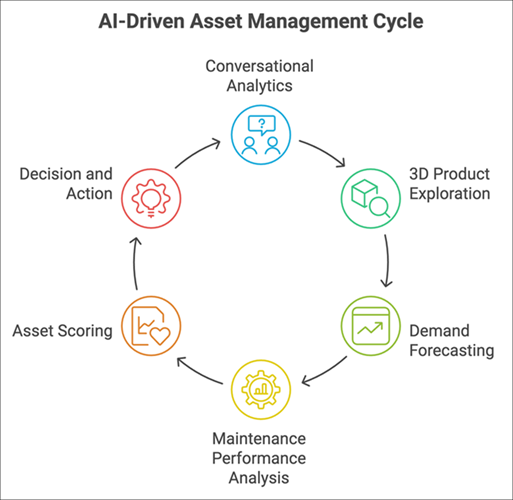
PTC Orbit provides four AI-powered capabilities that work together: conversational analytics in AI Hub, interactive 3D product exploration, demand forecasting based on historical work order patterns, and scoring models that quantify asset health. Each capability draws on the same underlying asset and service data; used together, they give you a complete analytical picture without requiring data science expertise.
Workflow Stages
1. Conversational analytics. Open AI Hub and ask a question in plain language. PTC Orbit generates charts, summaries, and data tables from your asset data. Save generated charts to your favorites for quick access, or customize them by adjusting chart type, grouping, or filters. For details, see AI Hub and Generating Charts using Prompts.
2. 3D product exploration. Load a PVZ file from Windchill directly in the AI Canvas to inspect a product in three dimensions. Navigate the product structure, search for individual parts, and use Spatial Search to identify neighboring components. Cross-asset part usage data shows where the same component appears across your installed base. For details, see 3D Product Explorer.
3. Demand forecasting. Predict future work order volumes and service hours by analyzing historical patterns. Filter by account, location, or product, and set a forecast period up to two years. The AI-assisted builder parses a plain-text goal into forecast parameters; the manual builder gives you full control. View results with charts, tables, and export options. For details, see Demand Forecasting.
4. Maintenance performance analysis. Open the Maintenance Performance Dashboard from AI Hub to evaluate maintenance effectiveness and risk trend impact across your installed base. KPI cards summarize completion rates, on-time percentages, and reactive service counts. An AI-powered filter prompt accepts natural language requests and translates them into structured dashboard filters. For details, see Maintenance Performance Dashboard and Filtering the Dashboard Using AI.
5. Asset scoring. Scoring models evaluate each asset against weighted factors for risk, health, and opportunity. Scores update during scheduled batch jobs and appear on the asset detail view. High scores surface assets that need proactive attention; declining trends flag emerging problems. For details, see Scores.
6. Decision and action. Insights from analytics, 3D exploration, forecasts, and scores converge on the dashboards and asset detail pages. A service operations manager reviews demand forecast projections alongside current asset health scores to determine staffing levels for the next quarter. A maintenance planner examines 3D product structure data to identify parts trending toward failure. These data points connect to the service execution workflow when action is needed: pending items, work orders, or campaigns.
Personas Involved
• End user: runs conversational analytics, explores 3D models, creates forecasts, analyzes maintenance performance dashboards, and reviews scores.
• Administrator: configures scoring models and dashboard layouts that display AI-driven metrics.
What to Do Next