Verify Link
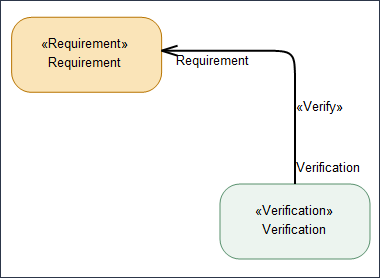
The Verify link in SysML2 is a formal relationship that connects a Verification case usage to a Requirement usage. Its purpose is to show that a specific verification activity is intended to confirm that a requirement has been satisfied.
Creating a Verify link
To create a Verify link between a Requirement usage and a Verification case Usage
1. On the System Structure Diagram ribbon toolbar, in the Flows section, click the  Verify button.
Verify button.2. On the diagram, click the Verification usage item and then click the Requirement usage item.
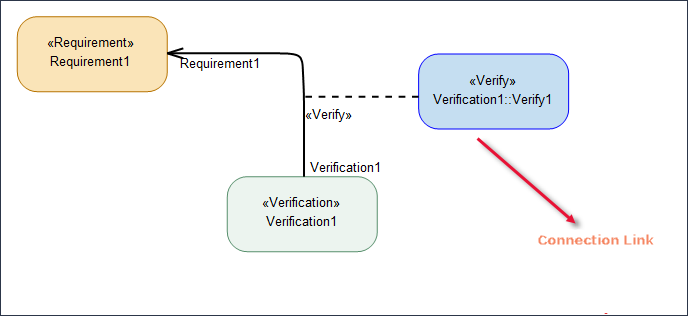
To create a connection link of the Verify Link, right-click the Verify Link and select > > . This creates a box-type version of the Verify Link as shown in the image below. This should not be mistaken for the Box Verify symbol that is explained in the section below.
Box Verify
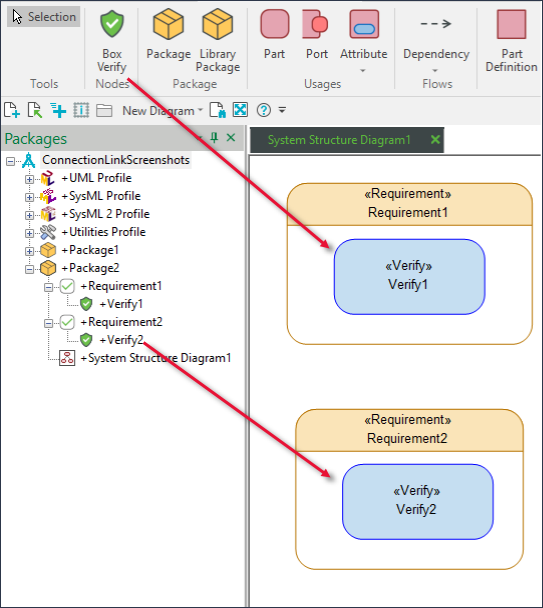
The Box Verify symbol can only reside within another dictionary item in the System Structure Diagram. The Box Verify symbol, located in the Nodes section of the System Structure Diagram ribbon, is a symbol that cannot be added directly onto the diagram canvas nor can you drag it from the Package browser and drop it onto the diagram.
In the image below, the Verify1 symbol residing within Requirement1 has been created from the System Structure Diagram ribbon, and the Verify2 symbol that resides within Requirement2 has been dragged and dropped from the Package browser.