Verification
A set of steps that you can perform to verify whether the subject of the verification satisfies one or more requirements. The set of steps are Actions that determine the Verdict. The requirement that is to be verified is declared as the Objective.
Creating a Verification definition
To create a Verification definition from the ribbon
1. On the System Structure Diagram ribbon, in the Cases section, click the  Verification Definition button.
Verification Definition button.2. Click on the empty space on the diagram to create the Verification Definition.
This creates a Verification definition symbol on the diagram.
To create a Verification definition from the context menu
1. Right-click on the Package or Package library in which you want to create the Verification definition.
2. Select > > > . This creates a Verification definition within the Package or Package Library. To add it to the diagram, drag the Verification definition and drop it on the diagram.
Creating a Verification usage
To create a Verification usage from the ribbon
1. On the System Structure Diagram ribbon, in the Cases section, click the  Verification button.
Verification button.2. Click on the empty space on the diagram to create the Verification usage.
This creates a Verification usage symbol on the diagram.
To create a Verification usage from the context menu
1. Right-click on the Package or Package library in which you want to create the Verification usage.
2. Select > > > . This creates a Verification usage within the Package or Package Library. To add it to the diagram, drag the Verification usage and drop it on the diagram.
Parameters used in Verification definitions / usages
Verification definitions / usages usually contain the following parameters:
• Objective
• Verdict
Creating an Objective for a Verification
To create an Objective for a Verification, perform the following tasks:
1. In the Package browser, right-click on the Verification for which you want to create an Objective.
2. Select > > > . A new Requirement is created under Verification in the Package browser.
3. Drag and drop this newly created Requirement on the Verification item on the System Structure Diagram. A popup menu is displayed.
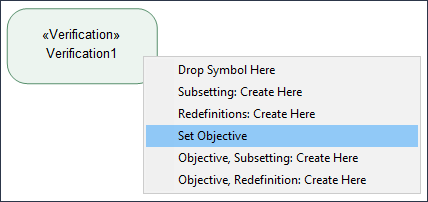
4. Select Set Objective. The Objective for the Verification is now created.
Setting a Verdict for a Verification
Verdicts can contain the following values:
• Pass
• Fail
• Inconclusive
• Error
To set a Verdict for a Verification, perform the following steps:
1. Select the Verification for which you want to create the Verdict.
2. In the Properties pane, in the Verification tab, locate the Verdict tag and select the value as required.