Connecting to Single Sign-On (SSO) Enabled OSLC Servers (PingFederate)
PTC Modeler supports Single Sign-On connections to PTC Modeler, PTC RV&S, PTC Windchill, and Codebeamer OSLC servers with PingFederate. To connect to the servers, you must follow certain instructions while adding the respective servers to PTC Modeler.
• When you add your first SSO-enabled OSLC server, you are prompted for Client and Secret for PTC Modeler. These values are generated by the PingFederate server and provided to you by the PingFederate administrator.
• After you enter the Client and the Secret you will be directed to the PingFederate login page and prompted to enter your username and password.
• The Client/Secret are encrypted and stored for your user account and used for all SSO-enabled OSLC servers you use; therefore, when you add any additional SSO-enabled OSLC servers in the future, you will not be prompted for these again.
• You will be periodically prompted to re-enter your username and password as required.
 |
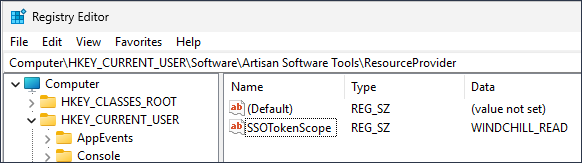
The default OAuth Token Scope used by PingFederate is WINDCHILL_READ. When a request is made by PTC Modeler to obtain an Access Token for a user, this value is sent by default. If your PingFederate default Scope is different, you can change the value by changing the SSOTokenScope string in the Windows registry. This string is located in the registry here: HKEY_CURRENT_USER\Software\Artisan Software Tools\ResourceProvider.
 |
Single Sign-On for OSLC Hyper-Media Previews
OSLC providers that support single sign-on may require additional authentication for accessing hyper-media (OSLC previews) in addition to the OAuth2.0 or OIDC for accessing data.
When you try to access OSLC previews that require additional authentication, the provider displays a login page that may be one of the following:
• A page within the Modeler OSLC preview window or
• An external browser pop-up
This login page might initially show the default login page in which case, you may have to click a link / button to load the SSO login page (for example, Codebeamer).
Enabling Authorization Code + PKCE Grant type in PingFederate servers
In PingFederated, PTC Modeler must be configured as an OAuth client as follows:
|
Setting
|
Value
|
|---|---|
|
Client Authentication
|
Client Secret
|
|
Redirect URI
|
• http://127.0.0.1/callback
Required for PTC Modeler OSLC client.
• https://<<server:port>>/account/entra-callback
Required for PTC Modeler OSLC server (replace <<server:port>> as required).
|
|
Allowed Grant Types
|
• Authorization Code
• Refresh Token
|
|
|
Note: PTC Modeler OSLC client is a desktop application and must use a listener service (loopback on localhost) to receive redirects from the PingFederate server during authentication set via redirect URI.
|