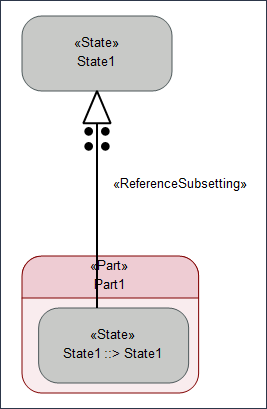
Exhibit States
States can also be exhibited by a part, such states are called as Exhibit States. The relationship between an Exhibit state and the State which has the Perform Action usage is formed by a Reference Subsetting connection.
Creating an Exhibit State
To create an Exhibit State, perform the following steps:
1. On the System Structure Diagram, create a Part Usage.
2. On the Package Browser, right-click on the Part and select > > > . A new Exhibit State usage is now created.
3. Drag this newly created State and drop it on the Part on the diagram.
4. On the System Structure Diagram ribbon toolbar, in the Relations section, click Reference Subsetting.
5. Click the State that you created inside the Part and connect it with an existing State in the diagram.