Tool Options dialogs - Grid Populate
This entry on the Tool Options dialog has the following controls. These controls are used to determine how the Populate function arranges items on a diagram.
• Grid Type
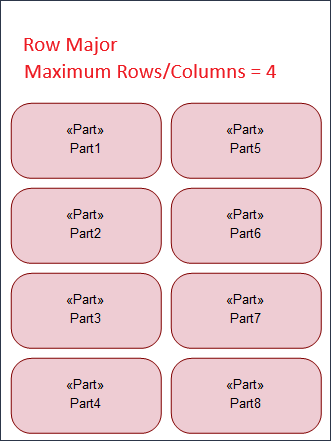
Row Major option – items are arranged vertically on a diagram. This is the default selection.
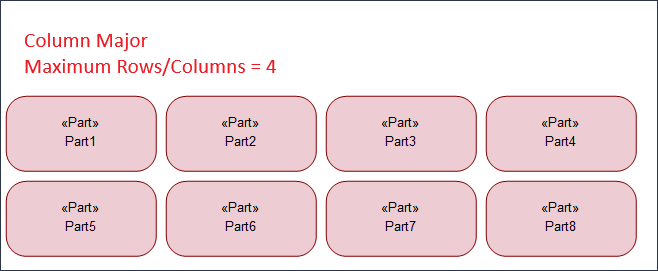
Column Major option – items are arranged horizontally on a diagram.
• Padding specifies distance between items in pixels. The default value is 30 px.
• Maximum Rows/Columns specifies the maximum number of rows or columns in which the Populate function can arrange the items on a diagram. If the Row Major option is selected, then while populating the diagram, the grid should not have more rows than the number specified in this field. Similarly, with the Column Major option, the grid cannot have more columns than the number specified in this field. The default value is 4.
For example, to populate 8 items on the diagram canvas with Row Major option and the Maximum Rows/Columns value as 4, Modeler populates items in a grid with 4 rows and 2 columns. With Column Major option selected, Modeler populates the items in 4 columns and 2 rows.
 |
 |