Task (dictionary item)

For automation interface information about a Task, see Task (automation interface).
A Task describes a group of objects that have a common thread of control. The thread of control consists of a series of Operations that may contain iterations and selections.
You can create a Task through the context menu of a Package: right-click the Package, and select > > > . In addition, you can create a Task through a Concurrency Diagram.
When used on a diagram, a Task's notation is as follows:
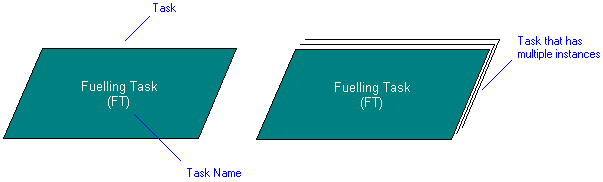
In the Modeler panes, a short-cut symbol  on the Task's icon indicates that the item is a stub.
on the Task's icon indicates that the item is a stub.
 |
If you select the Proprietary\Tasks folder in the Dictionary pane, the Contents pane displays the following information about each Task in the model: Worst Case Execution Time, Frequency and Priority.
|
The following sections provide information about how a Task is used in the model. For more information about a property, item, model part or diagram, click it.
Properties
In addition to the standard properties, a Task has these properties:
• Interrupt Handler — (Is Interrupt Handler through the automation interface)
• IRQ
• Priority
 |
The Class box on the Options tab of a Task's Property Pages shows the Class, Data Type or Interface that owns the Operations that implement the Task.
|
Owned by


Owns


 Dependency — The Dependency is owned jointly by the Task and the other associated item. The access permissions you have to a Dependency are determined by the access permissions of the dependent item.
Defined in these parts of the model

Used in:
Shown on these diagrams


Can be linked to these dictionary items

 Class — The linked Class contains the Operations required to implement the Task (drag Class to Task symbol on diagram).
 Data Type — The linked Data Type contains the Operations required to implement the Task (drag Data Type to Task symbol on diagram).
 Interface — The linked Interface contains the Operations required to implement the Task (drag Interface to Task symbol on diagram).
|
|
Like most other items in a Model, a Task can be linked to an Activity Partition, Comment, Frame Box, General Node, General Flow, General Flow Diagram Node, Constraint (applied), General Flow Diagram Flow or Swimlane.
|