Board io device (dictionary item)

For automation interface information about a Board IO Device, see Board io device (automation interface).
A Board IO Device is a piece of hardware that handles inputs to and outputs from a Board.
You can create a Board IO Device through the context menu of a Board Type, and through the Board IO Device tab of a Board Type's Property Pages.
When used on a System Architecture Diagram, a Board IO Device's notation is as follows:
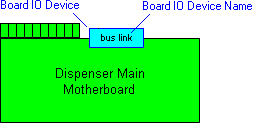
In the Modeler panes, a short-cut symbol  on the Board IO Device's icon indicates that the item is a stub. For more information, see ‘Stubs.
on the Board IO Device's icon indicates that the item is a stub. For more information, see ‘Stubs.Note that you cannot link a Board IO Device directly to a Board. A Board uses the Board IO Devices from a linked Board Type.
To see how a Board IO Device is used when defining a Board, see  .
.
.
 |
If you select the Proprietary\Board IO Devices folder in the Dictionary pane, the Contents pane displays the following information about each Board IO Device in the model: Memory Start Address, Memory End Address, Memory Size, Port Address and IRQ.
|
The following sections provide information about how a Board IO Device is used in the model. For more information about a property, item, model part or diagram, click it.
Properties
In addition to the standard properties, a Board IO Device has these properties:
• IRQ
Owned by

Owns


 Dependency - The Dependency is owned jointly by the Board IO Device and the other associated item. The access permissions you have to a Dependency are determined by the access permissions of the dependent item.
 Drop - The Drop is owned jointly by the Board IO Device and the associated Multidrop Bus. The access permissions you have to a Drop are determined by the access permissions you have to the source item.
 Point-to-point Connection - The Point-to-point Connection is owned jointly by the Board IO Device and the associated item. The access permissions you have to a Point to Point Connection are determined by the access permissions you have to the source item.
Defined in these parts of the model

Shown on these diagrams


Can be linked to these dictionary items
 Board IO Device Type - The linked Board IO Device Type specifies the technical details of the Board IO Device.
 |
Like most other items in a Model, a Board IO Device can be linked to an Activity Partition, Comment, Frame Box, General Node, General Flow, General Flow Diagram Node, Constraint (applied), General Flow Diagram Flow or Swimlane.
|