Use Cases
Cases
A case element is a type of calculation that produces a result intended to achieve a specific objective regarding a given subject. A case is a general element that provides the basis for Analysis, Verification, and Use Cases. A case must have a subject; the subject is a parameter represented by another model element. A case can have an objective and can also have actors. The actors in a use case are parameters and not elements. The body of a case can be specified using sub-actions and sub-calculations needed to achieve the case objective.
Use Cases
A use case element is a case that specifies the required behavior of its subject relative to one or more actors. It requires a subject; this subject is a model element, such as a part and for the use cases to behave as parameters, the Direction property must have a defined value. A use case has an objective, and the objective of the use case is to provide an observable result of value to one or more of its actors. A use case is typically specified as a sequence of interactions between the subject and the various actors. These interactions can be modeled as a message. This following image shows Use Cases used in a System Structure Diagram.

You can decompose / nest (create inside an existing element symbol) use cases in the following ways:
• Use drag and drop to nest the items.
• Use the context menu to create a nested item.
• Create a nested item from the diagram.
Creating Use Cases
You can create Use Cases from the System Structure Diagram toolbar and also from the context menu.
• To create Use Case from the diagram toolbar:
a. On the System Structure Diagram toolbar, click the Use Case button.
b. Click on the diagram canvas. This creates a Use Case.
• To create a Use Case from the context menu, tight-click the package in which you want to create the Use Case and select > > > .
 |
You cannot use SysML1 Use cases within a SysML 2.0 diagram or SysML 2.0 model elements.
|
Subjects
In PTC Modeler, use cases can optionally have a defined subject. SysML 2.0 expects all use cases to have a subject; therefore, it is recommended that subjects are defined to comply with the standard.
The subject for a use case represents the part of the system being modeled that is affected by the use case execution. In SysML 2.0, the subject is always modeled as a part element.
To define the subject for a use case, create or move a part to be an owned feature member of the use case. This can be performed on System Structure Diagrams using the toolbar as shown in the image below.
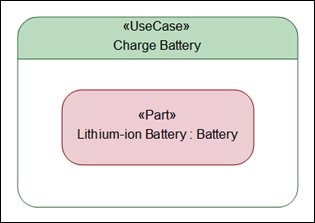
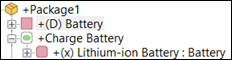
To define the part as the use case subject, you must convert it to a parameter by assigning a direction value. To do this, select the part and in the Properties pane, assign a value to the Direction property. The direction can be in, out or inout, depending on the behavior of the parameter. In the Package browser, the part name is now prefixed with (x) to denote that this feature is acting as a parameter, as shown in the image below.
| | Only the first part added to a use case can be defined as the subject. Subsequent parts that are added, and have the Direction property set, are defined as actors. |
Actors
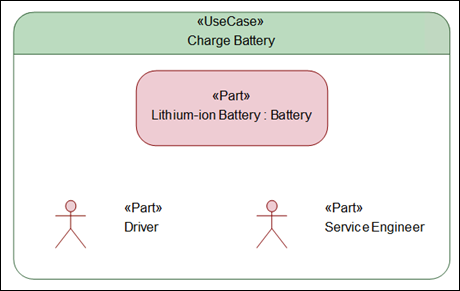
Using the same process as above, add more parts to the use case as owned feature members, and set the Direction property. These features now become actors for the user case, as shown below.
Updating Subjects and Actors
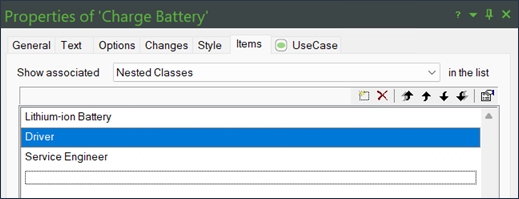
The first part that is a parameter in a use case is recognized by Modeler as the subject. Subsequent part parameters are recognized as actors.
To change which part is used as the subject, in the Properties pane for the relevant use case, modify the order using the arrow buttons. Alternatively, you can use SHIFT-ALT-UP or SHIFT-ALT-DOWN key combinations to move a selected part up or down.