To Resize a Large Matrix
1. Use function identity to create and display a large matrix.
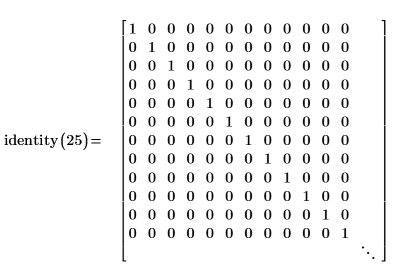
2. Select the matrix region, then on the Matrices/Tables tab, in the Result Format group, click Show Indices to display the matrix indices.
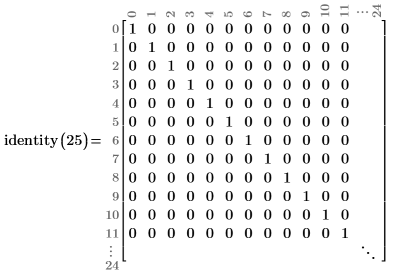
PTC Mathcad displays the first twelve rows and columns. The diagonal ellipses indicate that there are hidden rows and columns.
3. To display the hidden rows and columns, click and drag the bottom edge of the closing bracket. Keep dragging until the three ellipses disappear indicating that there are no more hidden rows or columns.
4. Click and drag the bottom edge of the closing bracket to resize the matrix. The three ellipses reappear.
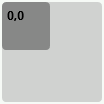
5. To pan hidden elements of the matrix without displaying hidden rows or columns, click the three ellipses. The matrix navigator window opens.
|
|
• The light-gray area represents the full matrix.
• The dark-gray area represents the currently displayed submatrix relative to its position in the full matrix.
• The pair of numbers represent the origin of the displayed submatrix.
|
6. Hover the pointer over the matrix navigator and perform one of the following actions depending on the new shape of the pointer:
◦  —Click and drag the dark-gray rectangle within the large matrix navigator to pan different parts of the full matrix.
—Click and drag the dark-gray rectangle within the large matrix navigator to pan different parts of the full matrix.|
|
As you navigate within the large matrix:
• The orientation and location of the three ellipses change.
• The numbers that represent the origin of the displayed submatrix is updated.
|
◦  or
or  —Click and drag to expand or contract the displayed submatrix horizontally or vertically.
or —Click and drag to expand or contract the displayed submatrix horizontally or vertically.◦  or
or  —Click and drag to expand or contract the displayed submatrix diagonally.
or —Click and drag to expand or contract the displayed submatrix diagonally.It is possible to expand the displayed submatrix until it covers the full matrix. When this happens, the dark gray area covers the whole navigator window.
|
|
• Copying a definition matrix results in copying the entire matrix, even if the matrix is resized and some of its elements are hidden.
• Copying a resized result matrix results in copying only the visible elements.
|