Formatting the Unit Display
To format the unit display of your worksheet, on the Math tab, in the Units group, click one of the following options:
• Unit System—The Unit System dialog box opens. Select an option from the Select unit system column.
◦ SI—International System
◦ USCS—United States Customary System
◦ CGS—Centimeter-Gram-Sec
◦ Custom—You can create a customized unit system, based on either SI, USCS, or CGS. Read more about customizing the unit system here: Custom Units.
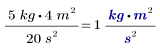
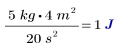
• Base Units—Displays the units as a set of base units or compound units.
|
With Base Units
|
Without Base Units
|
|---|---|
 |
 |