Example: Text Box
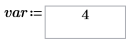
In this example, var is a variable you can control by changing the text inside a Text Box.
1. On the Input/Output tab, in the Controls group, click > .
2. Enter the input value name for the Text Box on the left side of the definition operator. Enter the input variable inside the Text Box.
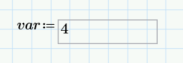
3. To define the item and its properties, right click it and select Edit. Then, select the Properties tab. In the Align Text drop-down menu, select Center.
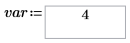
4. You can also select the Script Editor tab and edit the text box’s properties from the script.
|
|
Copy this example to your PTC Mathcad Prime worksheet to see the script that was used here in VBscript.
|
5. Use the value in the text box for different calculations.


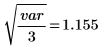
6. The example above is in VBscript. Copy the following examples to see the script in Jscript and Python.
◦ JScript
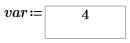
◦ Python
Download another example of the text box control: Text Box Example.
Watch this video to learn more about the Text Box control: