Example: Nested Arrays
Nested arrays can be used to store the results of repeated sequential calculations or imported data.
For information on using this example, see To Copy Math Examples from the Help.
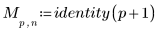
1. Use range variables and the identity function to define a nested matrix containing nine identity matrices.


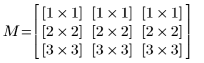
2. Display the nested matrix M:
|
|
In this example, the display of nested arrays is in a collapsed format. The nested array elements are not visible and only the number of rows and columns in each matrix is shown. To display the nested matrix elements, click inside the nested matrix region and then on the Matrices/Tables tab, in the Result Format group, click Collapse Nested Matrices.
|
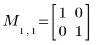
3. Display a few sub-matrices of the nested matrix M:

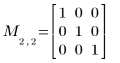
4. Define a nested vector element by element.
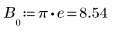

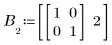
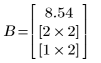
5. Display the nested vector B:
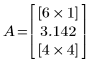
6. Create a nested vector by reading in data using the READPRN function.
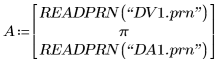
7. Display the nested vector A: