Example: Function Analysis Functions
Function Continuity
Analyze the expression’s continuity using isContinuous and discontPoints.
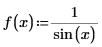
1. Define a function f(x).
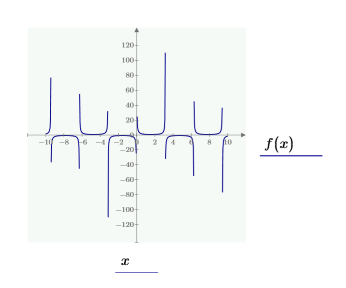
2. You can plot the function to visualize the analysis.
3. Use isContinuous to examine whether f(x) is continuous. Using isContinuous without an interval analyzes its continuity over the entire complex plane.
|
|
For all the function analysis functions, you can either define the expression you analyze outside the analysis functions, or type it inside the brackets.
|
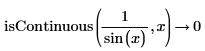
f(x) is not continuous over the complex plane.
4. Find if f(x) is continuous over the interval 1<x<2.
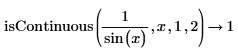
f(x) is continuous over the interval.
5. Use discontPoints to receive a vector of discontinuity points of f(x).
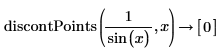
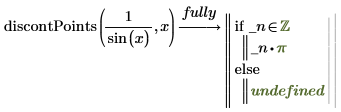
The function f(x) has an infinite number of discontinuity points. In this case, PTC Mathcad Prime returns a partial solution. Use the keyword fully to receive the complete distribution of discontinuity points.
Maximum and Minimum Points
Find local and global maximum and minimum points of an expression.
1. Define a function g(x).

2. You can plot the function to visualize the analysis.
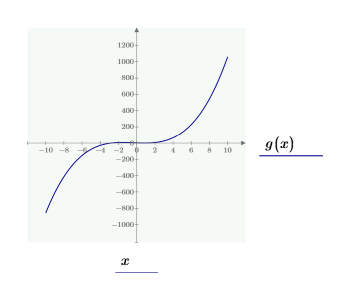
3. Use localMaxima to find the local maximum points of the function g(x). Without defining an interval, PTC Mathcad Prime displays the local maximum for -∞<x<∞.

4. Use localMinima to find the local minimum points of g(x).

5. Use globalMinima to find the global minimum point of g(x).

6. Use globalMaxima to find the local maximum point of g(x).

Extremum Points
You can find both minimum and maximum points of an expression by analyzing extremum points. Find local and global extremum points of an expression using localExtrema and globalExtrema.
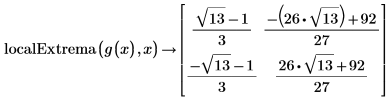
1. Use localExtrema to find the local extremum points of g(x). You receive both the local minima and the local maxima points.
2. Use globalExtrema to find the local extremum points of g(x). You receive both the global minima and the global maxima points.
