Link Tags
Link Tags are used to transfer data between two server tags. For example, this allows Tag A from Device A to be linked to Tag B from Device B without requiring a third-party client connection. When enabled, a Link Tag writes the value of an Input Tag to an Output Tag, effectively linking the two tags. The Link tag has the string value of <input tag> != <output tag> until the first link occurs, then the string becomes <input tag> == <output tag>. When disabled, a Link Tag does no linking and the OPC DA quality of the tag is “Bad - Out of Service.”
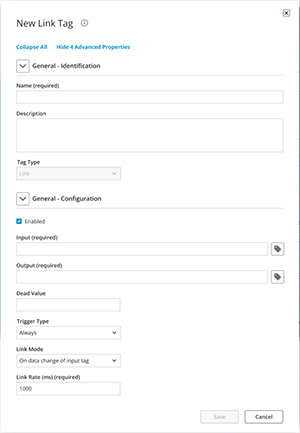
Identification
Name: Specify (or edit) the name for the tag. The name can be up to 256 characters in length and cannot contain periods, contain double quotes, or start with an underscore.
Description: Specify information or an explanatory comment for the tag. The description is a string of up to 255 characters.
Tag Type: Select or verify the type of the tag.
Configuration
Enabled: Specify if this tag is currently enabled / active. Tags that are enabled have references to other server tags and do computational work. Tags that are disabled have no references to server tags.
Input: Specify the Input Tag, which must be a valid server tag. It is used as the source of the link, and its value is written to the Output Tag.
 Note: The Input and Output fields cannot be the same.
Output: Specify the Output Tag, which must be a valid server tag. It is used as the destination of the link and is written to using the value of the Input Tag. The Output Tag must be writable.
Note: The Input and Output fields cannot be the same.Dead Value: Specify the value written to the Output if the Input is of bad quality. This value's data type is the data type of the Output. Users must choose dead values that are within the range of the Output tag's data type to ensure that no data is lost. If the field is left empty, the dead value is disabled. If disabled, the Output's value and quality does not change when the Input is bad quality.
Note: If the Output is an array tag, each array element is set equal to the Dead Value.Trigger Type: Specify when the configured link is active. The options are: Always, While Trigger Comparison True, and On Trigger Comparison True. The default selection is Always. Descriptions of the options are as follows:
• Always: The configured link is active as long as the server is running and the Link Tag is enabled.
• While Trigger Comparison True: The configured link is active when the server is running, the Link Tag is enabled, and the configured trigger comparison evaluates to true. While the logic defined for the trigger in the Comparison and Value fields is satisfied, linking occurs based on the configured Link Mode (i.e. On Data Change of Input Tag or On Interval). When the trigger comparison evaluates to false, no linking occurs.
• On Trigger Comparison True: If the server is running and the Link Tag is enabled, then the input is linked to the output when the logic defined for the trigger in the Comparison and Value fields is satisfied. At that moment, the Input Tag is read and the Output Tag is updated. No link occurs until a change in the trigger value occurs and satisfies the configured trigger logic.
Link Mode: Specify the required conditions to initiate the link. The default selection is On Data Change of Input Tag. Descriptions of the options are as follows:
• On Data Change of Input Tag: The input is linked to the output any time the input is good quality and its value changes. Tip: When the link mode is On Trigger Comparison True, a true trigger tag input change also causes a link.
Tip: When the link mode is On Trigger Comparison True, a true trigger tag input change also causes a link.• On Data Change of Input Tag (Ignore Initial Update): The input is linked to the output anytime that the input value changes, except for the initial update (which is ignored and does not count as an input value change). The Link Tag has the string value <input tag> != <output tag> until after the first update successfully completes. At that time, subsequent updates have the string value <input tag> == <output tag>.
Note: An initial update of bad quality is not considered an initial update.• On Interval: The input is linked to the output every Link Rate (milliseconds).
Link Rate (ms): The frequency of update as defined in this parameter depends on the chosen Link Mode. The valid range is 50 – 1800000000 milliseconds. The default setting is 1000. Description of the Link Rate for each of the Link Mode options is as follows:
Input Array Tag / Type | Output Array Tag / Type | Succeeds w/o Error |
|---|---|---|
K001[6] | K0100[6] | Yes |
K001[6] | K0100[2][3] | Yes |
K001[2][3] | K0100[6] | Yes |
K001[6] | K0100[2][2] | No |
K001[6] / Word | K0100[6] / DWord | Yes |
K001[6] / Float | K0100[6] / DWord | No |
Note: The examples above use address syntax from the Simulator Driver and do not include the channel and device names.