Create and Use an Alias
Create and Use an Alias
Complex Tag Reference Example
The image below displays a Complex tag reference in the server.

For example, to create a DDE link to an application for the "ToolDepth" tag, the DDE link must be entered as "<DDE service name>|_ddedata!Channel1.Device1.Machine1.Cell2.ToolDepth".
Although the DDE link's <application>|<topic>!<item> format still exists, the content becomes more complex when optional tag groups and the channel name are required as part of the topic. The alias map allows a shorter version of the reference to be used in DDE client applications.
 For more information, refer to What is the Alias Map.
Creating Aliases for Complex Address Paths
For information on creating aliases to simplify complex tag address paths, follow the instructions below.
1. In the tree view, select the alias to edit and double-click to open the alias node.
2. In the detail view, right-click and select New Alias (OR choose Edit | Aliases | New Alias). 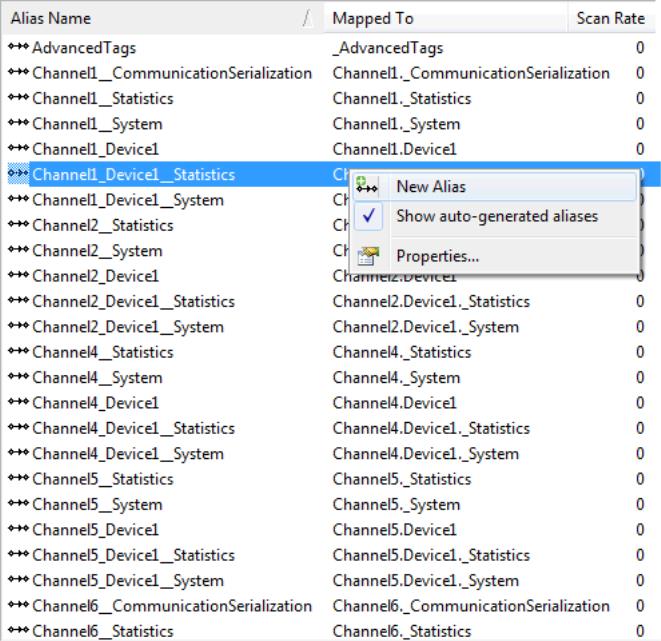
3. Browse to the group or device that contains the item to be referenced. 
4. Enter an alias name to represent the complex tag reference. This alias name can now be used in the client application to address the tag found in the server. For information on reserved characters, refer to How To... Properly Name a Channel, Device, Tag, and Tag Group.
5. The complex topic and item name "_ddedata! Channel1.Device1.Machine1.Cell2" can be replaced by using the alias "Mac1Cell2". When applied to the example above, the DDE link in the application can be entered as "<DDE service name>|Mac1Cell2!ToolDepth".
 Note: Although possible, it is not recommended that users create an alias that shares a name with a channel. The client's item fails if it references a dynamic address using the shared name. For example, if an alias is named "Channel1" and is mapped to "Channel1.Device1," an item in the client that references "Channel1.Device1.<address>" is invalid. The alias must be removed or renamed so that the client's reference can succeed.