Audit Log
Kepware Edge supports the ability report on changes made to Kepware server projects in the environment. This data is valuable in compliance, security audits, troubleshooting, and standardization.
Navigate to a server of interest and click on the Audit Log tab.
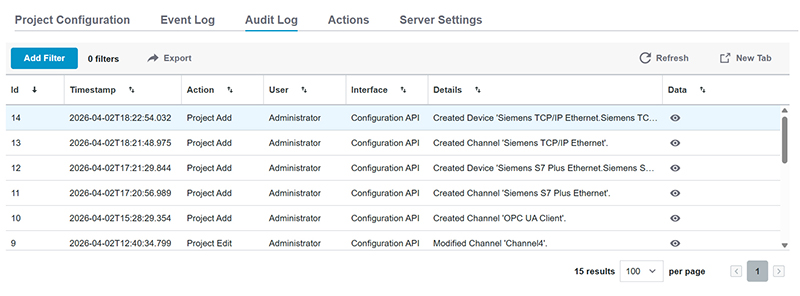
The Audit Log is a JSON array of objects, including:
• ID (number): Incrementing unique ID
• Timestamp (string): When the action occurred in yyyy-mm-ddThh:mm:ss.mmm format in UTC
• Action (string enum): What occurred (i.e. project add / delete / edit / move, server reinitialization, service invocation
• User (string): Who made the change (logged in username)
• Interface (string enum): Which interface was used (i.e. Configuration client, Configuration API)
• Details (string): What happened as a human readable description
• Data (object): What happened as unstructured JSON object, occasionally with additional meta-data/details
 Extensive filtering is supported to help target the events and changes you want to find. Filters by user, action, timestamp, etc. allow you create complex queries into what is happening in the environment. The column is sorted in ascending order when the arrow icon is pointing up
  . The column is sorted in descending order when the arrow icon is pointing down
  . The New Tab button opens the current view in a new browser tab so you can keep multiple filtered and/or sorted views open. Audit Logs access is controlled in the server Administration settings. Be default, Audit Log Access is set to Allow for Administrators and Deny for all other users.
 Audit Logs currently include server project events and changes. Other events, such as Administrative changes, are not included.