Device Properties — General
A device represents a single target on a communications channel. If the driver supports multiple controllers, users must enter a device ID for each controller.
 See Also: For API documentation for property information, consult the /config/v1/doc/drivers endpoint.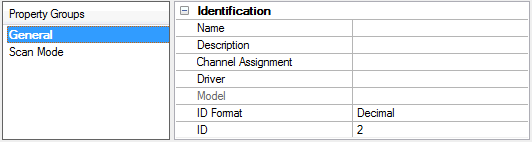
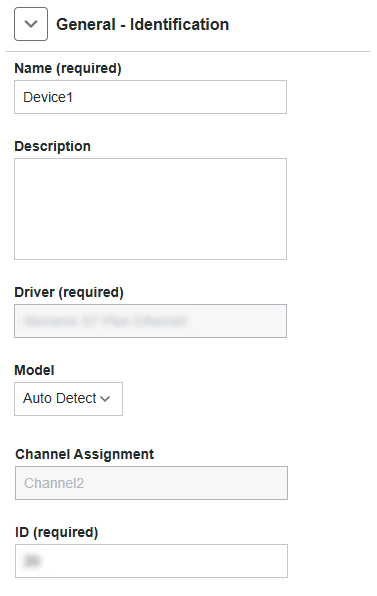
Identification
Name: Specify the name of the device. It is a logical user-defined name that can be up to 256 characters long and may be used on multiple channels.
 Note: Although descriptive names are generally a good idea, some OPC client applications may have a limited display window when browsing the OPC server's tag space. The device name and channel name become part of the browse tree information as well. Within an OPC client, the combination of channel name and device name would appear as "ChannelName.DeviceName". For more information, refer to "How To... Properly Name a Channel, Device, Tag, and Tag Group" in server help.
Description: Specify the user-defined information about this device. Many of these properties, including Description, have an associated system tag.
Many of these properties, including Description, have an associated system tag.Channel Assignment: Specify the user-defined name of the channel to which this device currently belongs.
Driver: Selected protocol driver for this device.
Model: Specify the type of device that is associated with this ID. The contents of the drop-down menu depend on the type of communications driver being used. Models that are not supported by a driver are disabled. If the communications driver supports multiple device models, the model selection can only be changed when there are no client applications connected to the device.
Note: If the communication driver supports multiple models, users should try to match the model selection to the physical device. If the device is not represented in the drop-down menu, select a model that conforms closest to the target device. Some drivers support a model selection called "Open," which allows users to communicate without knowing the specific details of the target device. For more information, refer to the driver documentation.ID: Specify the device's driver-specific station or node. The type of ID entered depends on the communications driver being used. For many communication drivers, the ID is a numeric value. Drivers that support a Numeric ID provide users with the option to enter a numeric value whose format can be changed to suit the needs of the application or the characteristics of the selected communications driver. The format is set by the driver by default. Options include Decimal, Octal, and Hexadecimal.
Note: If the driver is Ethernet-based or supports an unconventional station or node name, the device's TCP/IP address may be used as the device ID. TCP/IP addresses consist of four values that are separated by periods, with each value in the range of 0 to 255. Some device IDs are string based. There may be additional properties to configure within the ID field, depending on the driver.Operating Mode

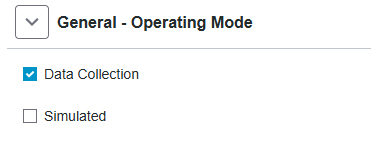
Data Collection: This property controls the device's active state. Although device communications are enabled by default, this property can be used to disable a physical device. Communications are not attempted when a device is disabled. From a client standpoint, the data is marked as invalid and write operations are not accepted. This property can be changed at any time through this property or the device system tags.
Simulated: Place the device into or out of Simulation Mode. In this mode, the driver does not attempt to communicate with the physical device, but the server continues to return valid OPC data. Simulated stops physical communications with the device, but allows OPC data to be returned to the OPC client as valid data. While in Simulation Mode, the server treats all device data as reflective: whatever is written to the simulated device is read back and each OPC item is treated individually. The data is not saved if the server removes the item (such as when the server is reinitialized). The default is No.
Notes:
Tag Counts

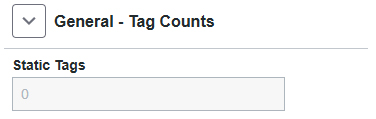
Static Tags: Provides the total number of defined static tags at this level (device or channel). This information can be helpful in troubleshooting and load balancing.