Channel Properties — Advanced
This group is used to specify advanced channel properties. Not all drivers support all properties; so the Advanced group does not appear for those devices.

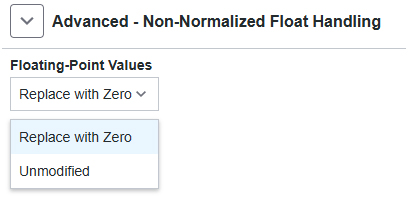
Non-Normalized Float Handling : A non-normalized value is defined as Infinity, Not-a-Number (NaN), or as a Denormalized Number. The default is Replace with Zero. Drivers that have native float handling may default to Unmodified. Non-normalized float handling allows users to specify how a driver handles non-normalized IEEE-754 floating point data. Descriptions of the options are as follows:
• Replace with Zero : This option allows a driver to replace non-normalized IEEE-754 floating point values with zero before being transferred to clients.
• Unmodified : This option allows a driver to transfer IEEE-754 denormalized, normalized, non-number, and infinity values to clients without any conversion or changes.
 Note: This property is disabled if the driver does not support floating-point values or if it only supports the option that is displayed. According to the channel's float normalization setting, only real-time driver tags (such as values and arrays) are subject to float normalization. For example, EFM data is not affected by this setting.
 For more information on the floating-point values, refer to "How To ... Work with Non-Normalized Floating-Point Values" in the server help.
Inter-Device Delay : Specify the amount of time the communications channel waits to send new requests to the next device after data is received from the current device on the same channel. Zero (0) disables the delay.
Note: This property is not available for all drivers, models, and dependent settings.