Defining Read Macros
Defining Read Macros
Read Macros are defined and redefined through the common interface shown below.
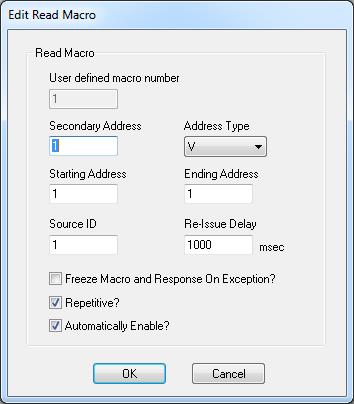
Each of the variables shown above are described in more detail in the table below.
 Each variable retains its definition and rules regardless of whether the macro is new or being edited.
Variable | Description/Rules | Default |
|---|---|---|
User Defined MacroNumber | Driver-specific number for identifying a macro, which is used in referencing macro data via OPC tag address. This number must be unique among both Read and Link Macros. | 1 |
Secondary Address | Secondary device (i.e. PLC) address for which the given macro applies to. | 1 |
Address Type | The data element type to be read in the macro. | V-Memory |
Starting Address | The first data element to be read in the macro | 1 |
Ending Address | The last data element to be read in the macro. The difference between the starting and ending addresses define the data block that is the macro. | 1 |
Source ID | The desired Source ID to store and execute this macro from. | 1 |
Re-Issue Delay | The "minimum reissue" delay time in milliseconds. This specifies the time to wait before reissuing the macro command and only applies to repetitive macros. | 1000ms |
Freeze Macro and Response On Exception? | An exception occurs when the data retrieved from the secondary differs from the data stored in the macro buffer. If desired, the macro can be configured to disable when such an exception occurs. This is termed freezing and can be accomplished by selecting the checkbox. This feature only applies to repetitive macros. | False |
Repetitive? | When this checkbox is selected, the macro will be repetitive. The HIU will automatically reissue the macro as long as the macro is enabled. Again, if a new response differs from a previous response, the exception flag is set. When this checkbox is not selected, the macro will be non-repetitive. When enabled, the macro will be issued, its exception flag set, and automatically be disabled. Re-enabling the macro will cause a reissue of the macro. | True |
Automatically Enabled? | When this checkbox is selected, the macro will automatically be enabled once downloaded. The MRSW will be reset to 0 and increment on every issue. When this checkbox is non-selected, the macro will not be automatically enabled. The MRSW will be set to 0x8001 and will require manual enabling for use. This is required case for Trigger Macros in a link. | True |