Device Properties — OPC Group
Device Properties — OPC Group
This group specifies the properties of the OPC group associated with the device.
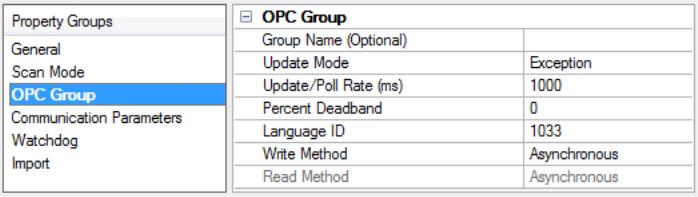
Group Name: This property specifies an optional name for identifying the group. If nothing is entered, the underlying OPC server will generate a unique name.
Update Mode: This property specifies the update mode. Options include Exception and Poll. Descriptions of the options are as follows:
• Exception: This option is added active, and the server will notify the driver of data value and quality changes. The driver first tries to establish an OPC 2.0 callback for the group. If that is not available, the driver attempts to establish an OPC 1.0 callback.
• Poll: This option is added inactive, and the driver reads all items attached to the group / device at the configured update / poll rate (or as close as possible). OPC DA 2.0 asynchronous reads are used if supported by the OPC server. If that is not supported, OPC DA 1.0 asynchronous reads are used. Note: In Poll mode, all tags are added as inactive. The server briefly sets the items to active during each poll cycle; as such, users may notice the active tag count in the server's status bar fluctuate. This is normal.
Note: In Poll mode, all tags are added as inactive. The server briefly sets the items to active during each poll cycle; as such, users may notice the active tag count in the server's status bar fluctuate. This is normal. Update / Poll Rate (ms): When Exception mode is used, this property specifies how often the underlying OPC server should provide updates for changing data. When Poll mode is used, this property specifies how often the driver should read the items attached to this group. The valid range is 0 to 3600000 milliseconds. The default setting is 1000 milliseconds.
Percent Deadband: This property specifies the percent change in data required to notify the client of a data change. This setting is used for Exception mode only.
Language ID: This property specifies the language used by the underlying server when returning values as text for operations on the group. The default setting is 1033 (English).
Write Method: The driver used Asynchronous OPC write operations by default. Select Synchronous for diagnosis of communication issues or to support non-standard OPC server installations. This property should be set to Asynchronous value in most circumstances.
Read Method: The driver uses Asynchronous OPC read operations by default. Select Synchronous for diagnosis of communication issues or to support non-standard OPC server installations. This property should be set to Asynchronous in most circumstances. Synchronous read method is only available when the update mode is set to polling.