|
Arbortext IsoDraw 菜单位置
|
命令
|
Windchill
|
说明
|
||
|
“文件”
|
输出
|
Windchill 服务器活动工作区
|
显示“输出”窗口,用来将 Arbortext IsoDraw 文件保存到本地或服务器上的选定目录。选取缺省保存的基本名称和文件类型。 此文件会在保存到服务器位置后附加到主 Arbortext IsoDraw 文件。
|
||
|
> > 。在“常用文件夹”下,单击服务器名称。
|
从 Windchill 服务器打开文件。
|
Windchill 服务器公用区活动工作区
|
显示 Windchill Virtual File System (VFS) 位置。
显示“打开”窗口。缺省情况下,显示活动工作区的内容。 也可以导航至 Windchill 服务器公用区来选择要打开的 Arbortext IsoDraw 文件。
您无法在“打开文件”对话框中选择多个文件。
|
||
|
“文件”
|
“另存为”
|
Windchill 服务器活动工作区
|
显示 Arbortext IsoDraw“另存为”窗口,您可以从中选择文件的保存目录,可以选择本地目录,也可以选择服务器上的目录。
如果连接到 Windchill,则将创建新的动态文档。
|
||
|
Arbortext IsoDraw 的 Windchill 工具栏 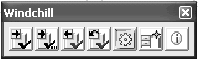 |
如果 Windchill 工具栏不可用 (灰显),  |
允许您执行命令或启动应用程序:
|
|||
 |
检入
|
||||
 |
检出
|
||||
 |
撤消检出
|
||||
|
Arbortext IsoDraw 的 Windchill 工具栏 |
|
检入
|
Windchill 活动工作区
|
自动将当前 Arbortext IsoDraw 文件检入 Windchill 服务器公用区。
|
|
|
Arbortext IsoDraw 的 Windchill 工具栏  |
|
检出
|
Windchill 活动工作区
|
检查当前 Arbortext IsoDraw 文件是否尚未检出。 如果没有,则将当前 Arbortext IsoDraw 文件检出到活动工作区。
|
|
|
Arbortext IsoDraw 的 Windchill 工具栏 |
|
撤消检出
|
Windchill 活动工作区
|
取消对当前 Arbortext IsoDraw 文件的检出。 检出时所做的所有修改均将丢失。
|
|
 图标将 Windchill 连接首选项设置为