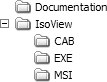
Installer Folders
Open your Arbortext IsoView 7.3CD or Arbortext IsoView 7.3 download Zip file temporary folder in Windows Explorer and browse the installer folders. Each folder’s contents are described below.
Documentation Folder
The Documentation folder contains the documentation you can read before you install Arbortext IsoView 7.3 software.
• (This guide.) 《Arbortext IsoView 安装指南》 (isov-inst.pdf)
• 《Arbortext IsoDraw 和 IsoView 信息指南》 (isov-relnotes.pdf)
• 《Arbortext IsoView 用户参考》 (isov-uref.pdf)
• 《Arbortext IsoView 编程人员参考》 (isov-pref.pdf)
| If you have Arbortext IsoDraw 7.3 software installed, you can also access these Arbortext IsoView 7.3 documents by choosing > in Arbortext IsoDraw 7.3. |
IsoView Folder
The IsoView folder contains three subfolders. Each subfolder contains the Arbortext IsoView 7.3 Distribution Kit installer program file in a different format.
• \IsoView\CAB contains IsoViewX73.cab in Microsoft native compressed archive format.
• \IsoView\EXE contains IsoViewX73.exe in executable format.
• \IsoView\MSI contains IsoViewX73.msi in Windows Installer format.
The instructions in this guide assume you will run the IsoViewX73.exe installer in \IsoView\EXE. However, all three installers launch the same Installation Wizard, so the instructions are the same regardless of which installer you run.