License Triad Configuration
Overview of Three-Server Redundancy
Using the three-server redundancy capability in FlexNet Publisher, all three license servers operate to form a triad. The license servers send periodic messages to each other to make sure that at least two servers are running and communicating. A quorum is formed when at least two of the three license servers are running and communicating with each other.
The license servers are identified as either primary, secondary, or tertiary. One license server is also designated as the master [m] and is responsible for:
• Serving licenses to FlexEnabled applications
• Recording information into the debug log
• Recording information into the report log
If the master fails, then another license server becomes the master.
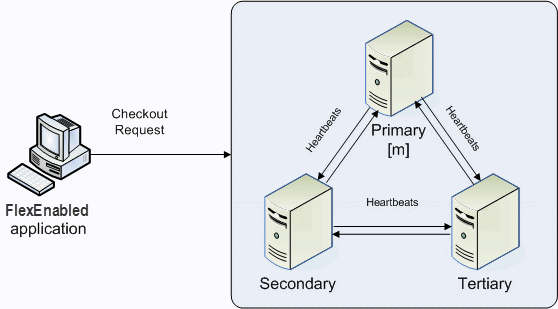
In the following figure, the primary license server is the master [m]. When a FlexEnabled application sends a checkout request for a license, the master responds and then serves the license to the FlexEnabled application.
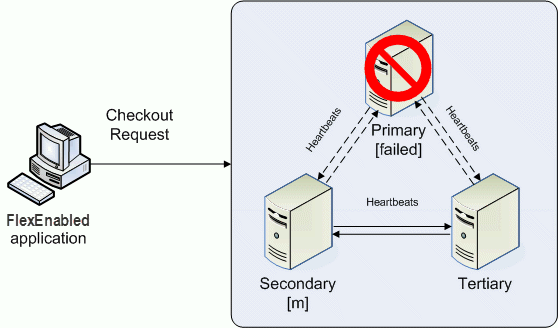
If the master fails, then the secondary license server becomes the master (see the following figure) and will server licenses to FlexEnabled applications. The tertiary license server can never be the master. If both the primary and secondary license servers go down, licenses are no longer served to FlexEnabled applications. The master will not serve licenses unless there are at least two license servers in the triad running and communicating.
Understanding How License Servers Communicate
When started, each license server reads the license file and checks that it can communicate with the other license servers. Until each license server establishes this first connection with the others, it will continue to send messages periodically.
Once the initial communication has been established, each license server periodically sends a heartbeat to the others. Heartbeats are messages sent over TCP/IP. Each license server sends a heartbeat and waits for a response from the other license servers. If a license server does not receive a response, it shuts down the vendor daemon so that it cannot serve licenses. A publisher or license administrator can configure the amount of time a license server waits to receive a heartbeat using the HEARTBEAT_INTERVAL property.
Poor network communication causes system performance to slow. Slow network communication can also cause a delay in the transmission of heartbeats between license servers.
Configuring License Servers for Three-Server Redundancy
Perform the following steps to configure three-server redundancy:
1. Before obtaining the license server software package from the publisher, identify and set up the three systems. When selecting systems, make sure they are stable. Do not use systems that are frequently rebooted or shut down.
2. Send the publisher the hostname and hostid values for these systems. Ask the publisher what system identifier they need for the hostid. This could be an Ethernet address, disk serial number, etc. The publisher will create license server components specifically for these systems.
| Best practice is to obtain a hostid of the same type for each of the three machines. Issues can arise if different hostid types are used in the configuration. If you plan to obtain the hostid using the default hostid type for a given machine, be aware that the default type can vary between operating-system platforms. |
3. After receiving the license server package from the publisher, change the following SERVER line properties in the license file if necessary:
◦ port number the license servers uses to listen for communication
◦ PRIMARY_IS_MASTER keyword
◦ HEARTBEAT_INTERVAL property
Do not change the hostid values. If the hostid changes at any time, the license administrator must work with the software publisher to obtain a new license file.
4. Perform any additional configuration as required by the software publisher.
5. Copy or install the license server software package to each of the three systems.
6. Start the license servers in the following order: primary, secondary, and then tertiary.
An Example License File
SERVER pat 17003456 2837 PRIMARY_IS_MASTER
SERVER lee 17004355 2837
SERVER terry 17007ea8 2837
VENDOR demo
FEATURE f1 demo 1.0 31‐dec‐2020 10 SIGN=”<...>”
180 Company Confidential FNP-111411-LAG00 License Administration Guide
Chapter 14 Ensuring License Availability
Managing License Servers in a Three-Server Redundant Configuration
FEATURE f2 demo 1.0 31‐dec‐2020 10 SIGN=”<...>”
The following portions of the license file directly affect the three-server redundant configuration:
• SERVER lines—Each line contains this information for the given server:
◦ The host name value: pat, lee, or terry.
◦ The hostid value: 17003456, 17004355, or 17007ea8. This example uses the value returned by the lmhostid utility default hostid type for each server.
| Keep in mind that the default hostid type can vary between operating-system platforms. Best practice is to use the same hostid type for all three servers. |
◦ The TCP/IP port—In this example, 2837. All servers use the same port to listen for communication.
The following properties of the license file do not affect the three-server redundant configuration directly, but are used to define license rights or configure the license server.
• VENDOR line—This required element references the publisher’s vendor daemon.
• FEATURE lines—The two features, f1 and f2, define the license rights. The SIGN value for each FEATURE line encodes the license server hostid values.
Configuring license triad with PTC Arbortext Content Delivery
Using this license file that has the triad configuration, you must deploy the standalone license server for PTC Arbortext Content Delivery.
To configure this license triad with PTC Arbortext Content Delivery, perform the following steps:
1. Navigate to the Configurator UI and modify the Host Name and Backup License Server Host Name for the License server entity as shown in the following image:
| • You must deploy the license server on all three machines using the same license file for triad that is provided by PTC. • You must start the license server in the same sequence as mentioned in the license file. For example, SERVER <Primary_Host> 630a7902 7790
SERVER <Backup_Host1> 630a8d02 7790
SERVER <Backup_Host2> 630aa602 7790
If the sequence is as mentioned above, then start Primary_Host first, followed by Backup_host 1 and then by Backup_Host2. • On Configurator UI, you must mention the license server in the same sequence as mentioned in the license file. |
2. Restart the Core, CoreCMI, and jBoss servers.