Advanced Solving with Derivatives
When solving with the minimize and maximize functions, Engineering Notebook automatically uses approximated versions of the first and second derivatives of the objective function. In advanced solving, you can define the first and second derivatives by entering a direct formula.
Use advanced solving with derivatives when the solution can be found only by directly defining the formulas. In addition, in some cases defining the first and second derivatives makes solving faster. In other cases, it makes the solving more accurate.
|
|
More accurate solving can result in greater calculation time.
|
Defining The First and Second Derivatives for Solving
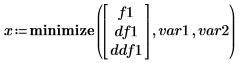
You can define the first argument of the minimize and maximize functions to be a vector with derivatives. If you do not define a vector, the first scalar argument is recognized as an objective function. Define the first argument as a scalar or a vector of 1x1, 2x1, or 3x1.
• Scalar or 1x1 Vector—The objective function name or expression.


• 2x1 Vector:
1. The objective function name or expression.
2. The first derivative name or expression, or a gradient when the objective function has multiple arguments.

• 3x1 Vector:
1. The objective function name or expression.
2. The first derivative name or expression, or a gradient vector Nx1 when the objective function is a function of N arguments.
3. The second derivative name or expression, or a Hessian matrix NxN when the objective function is a function of N arguments.
|
|
When you manually enter the first and second derivative of a function, Engineering Notebook cannot verify the formula you entered. Make sure to check that the derivatives you enter are correct, or calculate them separately using Engineering Notebook.
|