About Units and Constants in Symbolics
Engineering Notebook uses labels to associate mathematical elements, such as units and variables, in a worksheet with specific mathematical types.
The default label styles of inserted units and constants, as well as typed-in variables, are as follows:
• None—Italic/Black.
• Variable—Italic/Black.
• Unit—Italic/Bold/Blue.
• Constant—Italic/Bold/Green.
• Function—Regular/Black.
• System—Bold/Black.
• Keyword—Bold/Black.
Labels that are assigned by the system, or explicitly by the user, to an identifier do not change with context. Examples of such labels are ones that are set by default in the unit or constant placeholders or set by default when solving functions are inserted and so forth.
As a Engineering Notebook user, you have control over the assignment, and reassignment, of labels and label styles. This is true both when you perform symbolic or numeric calculations.
You can enable the Units/Constants in Symbolics option to give Engineering Notebook some control over the assignment of labels and label styles. In this Engineering Notebook infers the label and returns it as part of the result of a calculation.
• As the name implies, the Units/Constants in Symbolics option applies only to symbolic calculations!
• You can choose to perform symbolic calculations with this option disabled (default) or enabled.
• Enabling the Units/Constants in Symbolics option automatically modifies the existing worksheet contents, as needed.
• When enabled, and in the absence of previous definitions, labels are returned by Engineering Notebook reflecting assumptions that it makes when computing expressions.
Working with the Calculation Option “Units/Constants in Symbolics” Disabled
This is the default state when you open a new worksheet. Here, you have control over assigning labels to typed-in identifiers. In this case:
• Inserting a unit from the Ribbon gives the unit the label, and label style, of Unit. Evaluating the unit symbolically results in the right-hand-side (RHS) of the equation also getting assigned the label, and label style, of Unit.
• Inserting a constant from the Ribbon gives the constant the label, and label style, of Constant. Evaluating the constant symbolically results in the RHS of the equation also getting assigned the label, and label style, of Constant.
• Manually typing in an identifier gives the identifier the label, and label style, of None. Evaluating the identifier symbolically results in the RHS of the equation also getting assigned the label, and label style, of None.
Example:
a. Type the expression m +. Engineering Notebook assigns m the None label.
b. Type a second m and manually assign it the Unit label
c. Evaluate the expression symbolically:
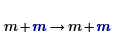
In this case, the result is identical to the input expression because Engineering Notebook does not attempt to resolve the labels based on its knowledge of built-in units or constants. Engineering Notebook treats the seemingly identical variables differently because they are labeled differently.
In general, if you type an identifier that has no special meaning to Engineering Notebook – a unit or a constant – then the identifier gets the default label of None. An exception to this rule applies when manually typing in the identifiers ∞ (Ctrl+Shift+Z), e, or π (p, Ctrl+G):
◦ Identifier ∞ is assigned the label, and label style, of Constant immediately and before applying the symbolic evaluation. After evaluation, the result is also assigned the label, and label style, of Constant.
◦ Identifiers e and π are initially assigned the label, and label style, of None. After evaluation, the label of the LHS remains None, but its label style changes to Constant. The results are assigned the label, and label style, of Constant.
Working with the Calculation Option “Units/Constants in Symbolics” Enabled
By enabling this option you allow Engineering Notebook to resolve and assign labels based on its knowledge of built-in units or constants.
If you enable this option after symbolically evaluating the previous expression, then Engineering Notebook returns:
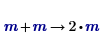
The labels of the left-hand-side (LHS) remain unchanged, but their label style changes to Unit. However, the labels, and label styles, of RHS change to Unit. This allows Engineering Notebook to symbolically add two variables that have the same label.
The insertion of units, or constants, from the Ribbon followed by symbolic evaluation yields the same results and labels as before. Thus, enabling this option has no effect on the built-in units and constants.
However, manually typing in identifiers and evaluating them symbolically yields the same results but the assigned label, and label style, depend on what you manually type-in:
• Typing an identifier that Engineering Notebook does not recognize as a built-in unit or constant, such as x, and evaluating it symbolically results in Engineering Notebook assigning both sides of the equation the label, and label style, of None.
• Typing, but without evaluating, an identifier that Engineering Notebook recognizes as a built-in unit or constant, such as c or m:
◦ Engineering Notebook assigns it the label, and label style, of None.
◦ If the typed identifier is c, then symbolic evaluation results in the LHS keeping the None label and Engineering Notebook automatically assigning the LHS the label style of a constant and assigns the RHS the Constant label and label style.
◦ If the typed identifier is m, then symbolic evaluation results in the LHS keeping the None label and Engineering Notebook automatically assigning the LHS the label style of a unit and assigns the RHS the Unit label and label style.
Engineering Notebook always treats ∞, e, or π as if the Units/Constants in Symbolics option is enabled.