About Programs
With a program, you can group calculations and return only the specified results. In Engineering Notebook, you create programs by inserting the program operator. This operator is a multistep container for Engineering Notebook program-control operators that provide the following function:
• Assign math expressions to local variables or functions
• Conditionally evaluate branches
• Loop over calculations
• Add breakpoints
• Trap errors
By combining Engineering Notebook features with the programming operators, you can write sophisticated programs. For example, you can program the following actions:
• Type math expressions in natural math notation
• Include units
• Call built-in constants and functions
• Refer to previously defined variables and functions
• Use Boolean operators in conjunction with conditional operators
• Use array operators, such as the index operator, with iteration variables
• Define multiple outputs in a matrix or a nested matrix
Engineering Notebook evaluates the sequence of statements in a program in the order specified by the programming operators. Engineering Notebook returns the result of the last step.
For example, the output of the following program depends on the last step or the specified return value.
• No return value is specified:
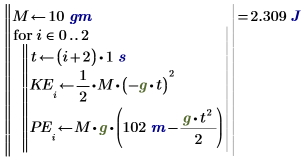
The program returns the result of the last calculation or PE2.
• KE is specified as the return value:
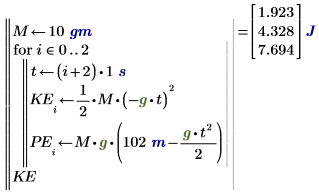
The last step here is the value of vector KE.
• PE is specified as the return value:
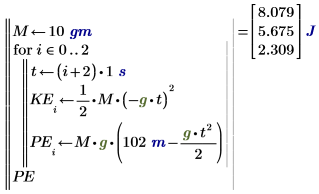
The last step here is the value of vector PE.
• [KE PE] is specified as the return value:
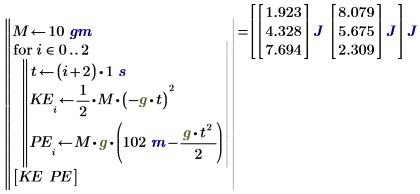
The last step here is the value of array [KE PE].
When you assign a program to a function, you can call the program in your calculations and you can plot the output.